Leave Request Email: Craft a Professional Message That Gets Approved in 2026
A leave request email is simply a formal note to your manager asking for time off. The best ones get straight to the point, stay professional, and give all the key details—like the dates you'll be gone and how you’ve got your work covered.
What Makes a Great Leave Request Email?

Writing a request for time off shouldn't be stressful. Instead of thinking of it as asking for permission, see it as presenting a professional and responsible plan. A well-crafted email shows you've thought ahead, and that you respect your manager’s and team's time. Honestly, it makes saying "yes" a whole lot easier for them.
The goal is to provide everything they need in one shot, so there’s no need for a long back-and-forth. This approach shows you're on top of things and helps your request get handled as a simple administrative task, not a fire drill.
To help you get it right every time, we've broken down the key parts of a solid leave request email.
Here’s a quick-reference table summarizing what every effective request should include.
| Key Components of a Leave Request Email | | :--- | :--- | :--- | | Component | Purpose | Example | | Clear Subject Line | Instantly tells your manager what the email is about. | "Leave Request - [Your Name] - [Dates]" | | Specific Dates | States the exact start and end dates of your absence. | "I would like to request leave from October 14 to October 18." | | Brief Reason | Provides context without oversharing. | "I am writing to request time off for a planned vacation." | | Work Coverage Plan | Shows you've planned for your absence to minimize disruption. | "I will complete the Q3 report before I leave. [Colleague's Name] has agreed to handle any urgent client queries." |
Nailing these four elements makes the entire process smooth and professional.
Why the Details Matter More Than Ever
The modern workplace has seen a real shift in why people need time away. For the third year in a row, employee leave requests are up, with 57% of organizations reporting a rise in requests for extended time off. And while sickness is still a major factor, mental health needs have jumped to the second spot at 47%. You can read more about these evolving employee leave trends on GTM.com.
This just goes to show how crucial clear communication is. When a manager gets a well-organized leave request email, they can quickly see the plan and approve it without any friction.
A thoughtfully structured request does a few key things:
- It eases your manager's mind. They immediately know that projects and deadlines are accounted for.
- It makes you look professional. It shows you're organized, responsible, and considerate of your teammates.
- It gets you a faster "yes." A complete request doesn't need follow-up questions, which speeds up the approval.
A strong work coverage plan is what turns your request from a simple question into a professional solution. It proves you're not just thinking about your time off, but also about the team's success while you're gone.
Ultimately, how you structure your email reflects your professionalism. By putting in a little effort upfront to include these key components, you create a message that’s not just easy to read, but also easy to approve. That way, you can get the green light and focus on enjoying your time away.
Get Your Subject Line Right
Think of your email subject line as the first—and most important—part of your leave request. In a flood of daily emails, a vague subject like "Question" or "Time off" is easy for a busy manager to overlook. Your goal is to make it impossible to miss.
A great subject line gives your manager the essential info at a glance: what you're asking for, who you are, and for what dates. It’s a small detail that shows you respect their time and helps them start planning for your absence before they've even opened the message.
The Best Formula for a Subject Line
There’s no need to get fancy here. The most effective subject lines are clear, direct, and predictable. They follow a simple, easy-to-scan formula: the type of leave, your name, and the dates. It’s less of a formality and more of a practical tool for your manager’s sanity.
Here are a few a tried-and-true examples you can adapt:
- For any planned leave:
Leave Request - [Your Name] - [Start Date] to [End Date] - A bit more specific:
Vacation Request - [Your Name] - [Dates] - For sudden sickness:
Sick Leave - [Your Name] - For urgent situations:
Family Emergency Leave - [Your Name] - Starting [Date]
Putting this level of detail right in the subject line helps your boss immediately categorize the email and start thinking about who can cover for you.
Your subject line is like a newspaper headline. If it doesn’t state the facts clearly, the important story inside might get completely missed. Make it clear and un-ignorable.
Keep It Simple—It Always Works Best
This isn't the place for creativity. Vague subjects just create more work for your manager, forcing them to open the email simply to figure out what it's about. Stick to the facts.
Just look at how a manager might see these different subject lines hitting their inbox:
| Weak Subject Line | Why It Doesn't Work | A Much Better Subject Line |
|---|---|---|
Out of Office |
Is this a quick dentist appointment or a multi-week vacation? The ambiguity forces a click. | Parental Leave Request - [Your Name] - [Dates] |
Request |
A request for... what? A new laptop? Help on a project? It’s too generic and gets lost in the noise. | Unpaid Leave Request - [Your Name] - [Dates] |
Vacation |
Who is this from and for when? In a big team, this is a recipe for confusion. | Vacation Request - Sarah Chen - July 10-17 |
When you use a clear, structured format, your leave request email looks professional and organized from the start. It sets a positive tone and helps kick off the approval process on the right foot.
Leave Request Templates for Common Scenarios
Alright, theory is one thing, but seeing how it works in practice is what really counts. Let's walk through some ready-to-use templates for the most common reasons you might need time off.
Think of these less as rigid scripts and more as starting points. Each one is designed for a specific situation, complete with the right tone and details to help you get your request approved without any back-and-forth.
The Vacation Request
This is your standard, run-of-the-mill request. The goal is simple: be clear, be polite, and show that you’ve thought ahead. Giving at least two weeks' notice is good practice, but for longer trips, a month is even better.
What really makes a difference here is showing you're on top of your work. By mentioning how your duties will be covered, you’re not just being responsible—you're making it incredibly easy for your manager to say "yes."
Subject: Vacation Request - [Your Name] - [Start Date] to [End Date]
Hi [Manager’s Name],
I'm writing to request vacation time from [Start Date] to [End Date], and I'll be back in the office on [Return Date].
I'm looking forward to taking some time to recharge. Before I leave, I’ll make sure all my urgent tasks are wrapped up. I’ve already spoken with [Colleague’s Name], who has kindly agreed to be the point person for any critical matters that come up while I'm away.
I’ll check emails periodically for emergencies, but otherwise will be fully offline. Please let me know if you need anything else from me to prepare for my absence.
Thanks,
[Your Name]
The Sick Day Notification
When you're sick, the last thing you want to do is write a novel. Your email should be short, sweet, and to the point. You don't owe anyone your specific medical diagnosis; just state that you're unwell and can't work. That's it.
The key is communicating quickly so your team can plan accordingly. If you think you might be out for more than a day, a quick end-of-day update is always appreciated.
Subject: Sick Leave - [Your Name]
Hi [Manager’s Name],
Just wanted to let you know that I woke up feeling unwell and won't be able to come in today, [Date].
I'll keep an eye on my email for anything urgent. I’ll also let you know my status for tomorrow later today.
Apologies for any inconvenience.
Best,
[Your Name]
A quick tip: Keep it simple. Seriously. Over-explaining can come across as unprofessional and just invites questions you don't need to answer. A direct message respects your privacy and your manager's time.
The Parental Leave Plan
This one is a big deal! Requesting parental leave is an exciting milestone, but it also requires a lot more planning than a typical vacation. You'll want to give several months' notice to make sure everyone has time to prepare for a longer absence.
Think of this email as the official kickoff to a larger conversation. It should be professional and forward-looking, showing that you're committed to a smooth transition before and after your leave.
Subject: Parental Leave Request - [Your Name]
Dear [Manager’s Name],
I’m writing to formally request parental leave for the upcoming birth of my child, who is due around [Expected Due Date].
Based on our company policy, I’d like to request my full [Number] weeks of leave. My plan is to start my leave on [Proposed Start Date] and return to work on or around [Proposed Return Date].
I’m fully committed to making the handover process as smooth as possible. I've already started documenting my projects and will work with you to build out a solid coverage plan. I'm also happy to help train whoever will be covering for me.
Please let me know the next steps for formalizing this with HR. I look forward to talking more about the transition plan.
Thank you for your support,
[Your Name]
It’s really important to know your rights here. In California, for instance, the Paid Family Leave (PFL) program offers partial pay not just for bonding with a new child but also for caring for a sick family member. This is funded by employee payroll deductions (you'll see it as "CA SDI" on your paystub) and can provide up to eight weeks of benefits.
The Unexpected Family Emergency
Life happens, and sometimes you need to drop everything with zero notice. In these moments, clarity and brevity are your best friends. You absolutely do not need to share sensitive, personal details.
The goal is to simply inform your manager that you're out and, if you know, for how long. The tone should be direct and serious. Send the email, then go focus on your family. Work can wait.
Subject: Urgent - Family Emergency - [Your Name]
Hi [Manager’s Name],
I'm writing to let you know that I need to take leave immediately due to a family emergency. I will be out of the office starting today, [Date].
I'm not sure of my exact return date yet, but I will keep you updated as soon as I know more. I'll try to check in on emails when I can.
Thank you for your understanding.
Regards,
[Your Name]
When you have a free moment, it's a good idea to set up an automatic reply. We have some great examples in our guide to setting up the perfect out-of-office message that can help manage expectations.
The Unpaid Time Off Request
Asking for unpaid leave requires a bit more finesse. Because it’s outside of your standard PTO, you’ll want to provide a clear reason and show you've thought through the impact on your team.
Your email should acknowledge that you know this is a special request. It helps to frame the time off as something beneficial, whether it's for a professional development course, a once-in-a-lifetime trip, or handling a personal matter that just needs more time.
The flowchart below is a great mental model for how to approach any leave request. It shows how the reason for your leave—planned, sick, or special—should shape the information you provide.
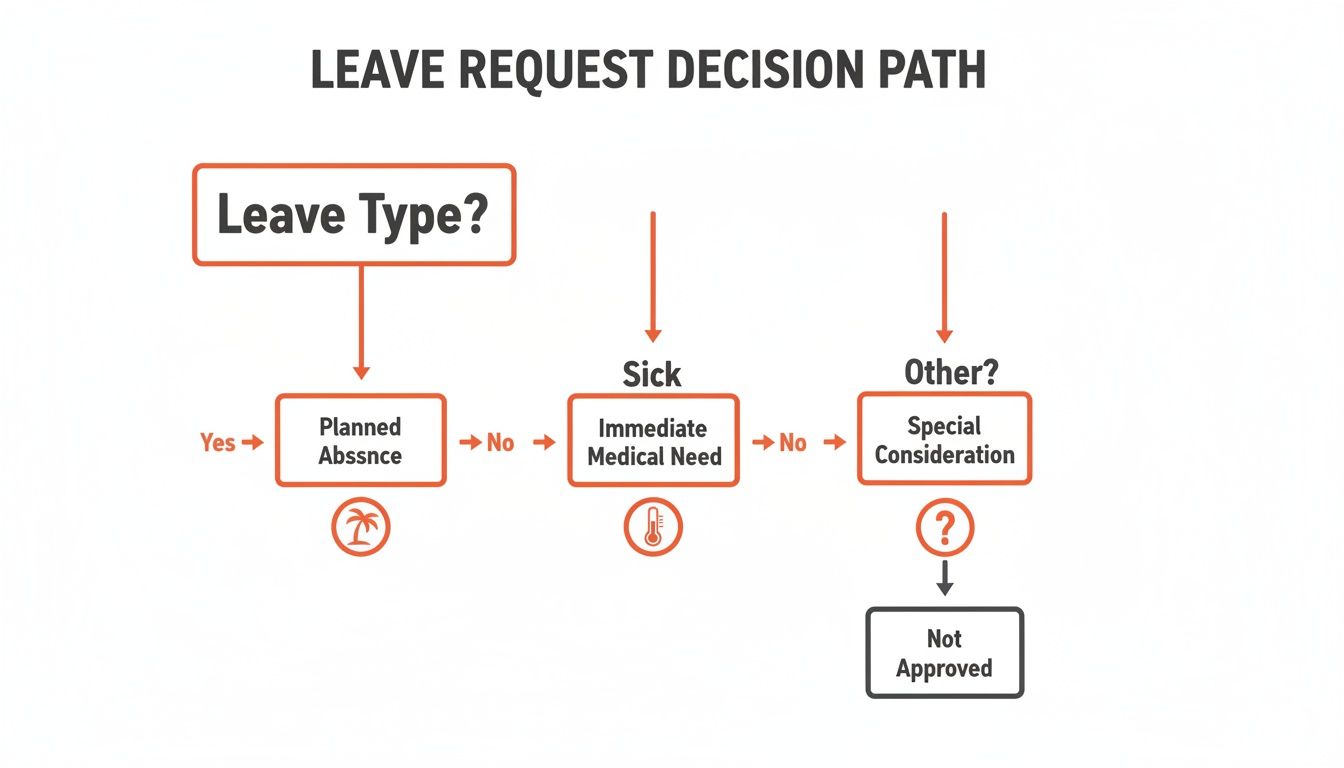
As you can see, the more notice you can give and the more you plan for your absence, the smoother things will go.
Subject: Unpaid Leave Request - [Your Name] - [Dates]
Hi [Manager’s Name],
I'm writing to request a period of unpaid leave from [Start Date] to [End Date]. This time would allow me to [briefly and professionally state the reason, e.g., attend a professional development course, handle a personal matter requiring my full attention].
I’ve reviewed my current projects and am confident I can complete all critical deliverables before I leave. I've also put together a plan to hand off my other responsibilities to [Colleague’s Name] to ensure everything runs smoothly in my absence.
I understand this is an unusual request and am happy to discuss it with you whenever you have a moment. I can also be flexible on the dates if needed.
Thank you for considering my request.
Best,
[Your Name]
Know the Rules and Nail the Follow-Up
You’ve sent your leave request—great! But clicking "send" is only half the battle. Getting your time off approved often comes down to two things most people overlook: knowing your company’s official policy inside and out, and knowing how to follow up if you get radio silence.
First things first, dig up your company's leave policy. You can usually find this in the employee handbook or on the company's internal HR site. This isn't just a formality; it's the rulebook for getting your request approved without a hitch.
This policy will have all the critical details you need:
- Notice Periods: It tells you the minimum heads-up you need to give for different kinds of leave.
- Accrual Rates: This is how you find out how you earn your paid time off (PTO) and, most importantly, how much you have in the bank.
- Blackout Dates: Many companies, especially in fields like retail or finance, have busy seasons where taking time off is a no-go.
- Approval Process: Does your request go straight to your manager, or does HR need to sign off on it, too?
Checking these rules before you write your email shows you’re being responsible and saves you the headache of submitting a request that gets automatically denied.
It's All in the Timing
Beyond the official rules, timing is everything. When you send your leave request email can make a huge difference in how quickly it gets approved. Take a second to think about your team’s schedule and any big deadlines coming up.
Try to avoid sending it during a crazy week, like right before a huge project launch or at the end of the quarter. Your best bet is to aim for a calmer time when your manager can actually give your request the attention it deserves. Think Monday morning or sometime mid-week, not a Friday afternoon when everyone’s mind is already on the weekend.
This small bit of strategy shows you respect your team's workload and frames your time off as a well-planned event, not a last-minute disruption.
What to Do When You Hear Nothing Back
So, you sent the perfect email... and now you're just hearing crickets. It’s easy to start stressing out, but don't panic. Managers are juggling a million things, and your email could have just slipped through the cracks. It's totally fine to send a polite follow-up.
Give it a reasonable amount of time. A good rule of thumb is to wait about 3-5 business days before sending a gentle nudge. This shows you're on top of things without seeming pushy. You're just looking for a quick reminder, not a confrontation.
"Hi [Manager’s Name],
Just wanted to gently follow up on the leave request I sent last [Day of the week] for the dates [Start Date] to [End Date].
No rush at all, but I'd love to get it confirmed when you have a moment so I can finalize my plans.
Thanks so much,
[Your Name]"
This short, friendly note puts the request back on their radar without adding any pressure. It's professional, respectful, and almost always gets you the green light you need to start booking things.
This kind of clear communication is a huge part of avoiding what some call "annual leave anxiety." It’s no surprise that 51% of professionals admit to checking work emails on vacation, often because they’re worried about falling behind. A firm approval and a solid coverage plan are your best tools for truly disconnecting. If you're interested, you can read more about managing leave-related stress from Robert Walters.
Ultimately, mastering the company policy and the follow-up are just as important as writing the initial email. They're the final steps to ensuring your time off is approved, accounted for, and genuinely stress-free.
Writing a Request That Sounds Like You

The main problem with using a template for your leave request email is that it can sound… well, like a template. It comes off as impersonal and rigid. If you have a friendly relationship with your manager, a stuffy, formal email can feel completely out of character.
The goal isn't to sound like a corporate robot; it's to communicate clearly and professionally while still sounding like yourself.
Making a template your own is all about a few small, deliberate tweaks. You don't have to rewrite the whole thing, but you do need to inject your personality in the right places to bridge the gap between a generic script and your own voice.
After all, the way you consistently communicate builds trust and makes your professional relationships run more smoothly.
A Quick Checklist to Make It Your Own
Before you hit "send," take a couple of minutes to run through this checklist. These simple edits can transform a generic draft into something that genuinely sounds like it came from you.
Check the Opener and Closer: How do you normally greet your manager? If you always start with "Hi [Name]," don't switch to "Dear [Name]" just because the template says so. The same goes for the sign-off. If "Best," or "Thanks," is your usual, stick with it.
Mix Up the Sentences: Templates often rely on very simple, direct sentences. If you naturally use a mix of long and short sentences or phrases like "Just a quick heads-up," or "As we talked about," go ahead and weave them in.
Swap Out Stuffy Words: Scan the draft for any words or phrases that make you cringe. If a template uses "I wish to request," but you would always say "I'd like to request," make the change. It's these tiny word swaps that make an email feel authentic.
Match Your Everyday Tone: The formality of your request should mirror your daily interactions. If your rapport with your boss is casual, a slightly warmer tone is perfectly fine. If your communication is always more formal, keep it that way.
Think of a template as a starting point, not a final script. It gives you the basic structure, but you provide the personality that makes it sound human.
Taking a moment for these small adjustments ensures your email does its job without sacrificing the personal touch that defines how you communicate. It’s a small effort that makes a huge difference in how your message lands.
Beyond Manual Edits: When AI Learns Your Style
Editing templates by hand absolutely works, but it still takes time and a bit of mental energy. This is where modern email assistants are starting to really shine. Instead of forcing you to adapt to a generic template, the right tool can adapt to you.
Imagine an assistant that already knows your writing style because it’s learned from your past emails. It gets that you start group messages with "Hey team" but use "Dear Ms. Jones" when writing to an executive. It understands your preference for short, punchy sentences or your habit of ending with a friendly closing line.
This is the whole idea behind tools like Draftery. It moves past one-size-fits-all AI and toward truly personal writing assistance. By analyzing how you’ve written to specific people before, it generates a draft that already sounds like it came from you. The email it creates for your CEO will naturally be more formal than the one for your work bestie, because the AI has learned that distinction from your own history.
How It Learns Your Unique Voice
This isn't magic; it's just smart pattern recognition. Here’s a simple breakdown of how it works:
- Style Analysis: The tool scans your sent mail to figure out your go-to vocabulary, typical sentence length, tone, and even how you use emojis.
- Relationship Learning: It starts to understand the different "voice profiles" you use for each person. It learns that your tone with the design team is creative and collaborative, while your tone with the accounting department is direct and to the point.
- Context-Aware Drafting: When you need to write a new email, like a leave request, it pulls everything together: your style, your relationship with the recipient, and the specific context of the request.
The result is a draft that feels right and needs very little editing. For example, if you're asking for time off from a manager you have a great, casual rapport with, the AI might generate a warm and concise draft. For a brand-new boss, it would likely produce something more detailed and formal.
You can also use tools to gut-check your own writing. If you've written an email but aren't sure how it will come across, you can use a free email tone analyzer to get instant feedback on its clarity and feeling before sending. This mix of smart drafting and personal refinement gives you complete control while saving a ton of time. It's about making technology work for you, without losing your personal touch.
Common Questions About Requesting Time Off
Even with the perfect template in hand, you probably still have a few lingering questions. It's totally normal. Nailing the small details is what gives you the confidence to finally hit 'send'.
Let's walk through some of the most common questions people have when asking for time off.
How Much Notice Should I Give for a Leave Request?
This is a big one. The sweet spot is a mix of following company policy and just being considerate. As a rule of thumb, aim for at least two weeks' notice for a short break of one to three days. If you’re planning a longer trip, giving a month or more is the standard.
Your first stop should always be the employee handbook—it will have the official minimum notice period. But honestly, the more notice you can give, the better. It gives your manager a chance to plan ahead and makes your absence a non-issue for the team. That kind of foresight always goes a long way.
Do I Need to Explain Why I Need Personal Leave?
In short, no. You don't owe anyone a detailed explanation for your personal time. For a vacation or personal day, something simple like "for a planned vacation" or "for personal reasons" is all you need. You can be honest without oversharing.
The same goes for sick leave. Just state that you're unwell and won't be able to work. You are under no obligation to share specific medical details.
The goal of your leave request email is to give your manager the essential info for planning purposes. They need to know when you'll be out, not a play-by-play of why.
If you want to read more about striking the right professional tone in your messages, our guide on the best practices for email communication is a great resource.
What Should I Do if My Leave Request Is Denied?
First, don't panic. It’s easy to get frustrated, but an emotional reaction won't help. Take a breath and send a polite, professional reply asking for a bit more context on why it was denied.
From there, you can open up a conversation. Try asking if there's a better time to take your leave or if there's anything you can do to address their concerns. Approaching it as a problem to solve together can often lead to a good compromise.
You could suggest things like:
- Shifting your leave dates slightly
- Tweaking your work coverage plan to be more robust
- Brainstorming another solution that works for everyone
If you’ve tried to find a middle ground and still feel the denial is unfair, that’s the time to consider looping in HR for guidance.
Crafting professional emails takes time, but what if you could automate it? Draftery is an AI assistant that learns your writing style and automatically drafts replies that sound just like you. It's the fastest way to handle your inbox without losing your personal touch. Start your free 7-day trial of Draftery.