Your Guide to the AI Powered Email Assistant
Let's be honest—your inbox is out of control. An AI-powered email assistant acts like your own personal executive aide, built to win back the 250+ hours most professionals lose to email every single year. It’s a smart tool that learns how you write and then pre-drafts replies that sound just like you sent them yourself.
The End of Inbox Overload
Picture an assistant who has read every email you’ve ever written. It gets your style, understands your relationships, and has a context-aware reply drafted before you’ve even opened a new message. That’s what a good AI email assistant does. It’s not just another gadget; it's a completely new way to handle your communications.
This isn't about slapping a generic template into a reply. Instead, the AI gives you intelligent, personalized suggestions for each specific conversation, helping you get back your most valuable resource: your time. And the speed at which people are adopting these tools proves just how much value they deliver right away.
There's a reason the market for these assistants is exploding. After being valued at $2.11 billion in 2025, it's expected to climb to $2.56 billion by 2026, growing at a rate of 21.2% each year. This boom is happening because professionals are tired of losing so much of their day to their inboxes. You can read more about these email market trends to see the full picture.
A Clear Before and After Picture
The difference an AI assistant makes is obvious from day one. It turns those reactive, time-sucking email sessions into a series of quick, decisive actions. No more staring at a blank screen or digging through a messy inbox. You’re simply reviewing ready-to-go drafts that just need your final approval.
The impact goes way beyond just your inbox, touching your entire workday:
- Productivity: You’ll spend far less time on admin and more time on the strategic work that actually moves the needle.
- Response Quality: Every reply comes across as thoughtful and personal, strengthening your professional relationships without any extra effort.
- Mental Energy: By offloading the constant cognitive drain of managing email, you free up your focus for what really matters.
To see just how big of a shift this is, let's look at the daily grind of handling email manually versus with an AI assistant.
The table below provides a clear, at-a-glance comparison, showing exactly how an AI assistant changes the game for your daily workflow.
Email Management Before and After an AI Assistant
| Activity | Without AI Assistant (Manual) | With AI Assistant (Automated) |
|---|---|---|
| Opening Email | Sifting through a cluttered inbox, deciding what to tackle first. | Inbox is pre-sorted by priority; key emails are flagged with draft replies ready. |
| Drafting a Reply | Typing out each response from scratch, re-reading for tone and typos. | Reviewing a pre-written, context-aware draft that matches your voice. |
| Finding Information | Manually searching past threads or files for context to answer a question. | AI automatically pulls relevant context from previous conversations. |
| Managing Follow-ups | Setting manual reminders or letting important conversations slip. | Assistant automatically suggests follow-ups for unanswered emails. |
| Daily Time Spent | 1-3 hours of reactive, fragmented work. | 15-30 minutes of focused, decisive action. |
As you can see, it’s a total transformation. Instead of being a slave to your inbox, you’re back in the driver’s seat, using email as the efficient communication tool it was meant to be.
How AI Learns to Write Emails That Sound Like You
Ever wonder how an AI email assistant can draft a message that sounds just like you wrote it? It’s not magic, but it’s a pretty clever process. The secret lies in how the AI analyzes your past writing to predict your future needs.
It all starts when you connect your email account. By giving the tool secure, read-only access, you’re essentially handing it a library of your past conversations. This is where the AI begins its real work: learning what makes your writing style unique.
Building Your Personal Voice Profile
The assistant gets to work by scanning your sent mail folder. It’s not just looking at the words you use; it's searching for thousands of tiny patterns that make up your communication style.
From this analysis, it creates your personal voice profile. This profile documents everything from your favorite greetings (like "Hi team," vs. "Hey John,") to your go-to sign-offs ("Best," vs. "Cheers,").
An AI assistant doesn't just learn what you say; it learns how you say it. It tracks your vocabulary, typical sentence length, formality level, and even your use of emojis to create a digital fingerprint of your writing style.
This profile acts as the starting point for every draft the AI generates for you. It’s the foundation that makes the suggestions feel familiar right away. But a truly great assistant doesn't stop there.
The Power of Per-Recipient Voice Matching
Let’s be honest—you don’t write to your CEO the same way you write to a close colleague. You adjust your tone, formality, and even sentence structure based on who you're talking to. A good AI assistant knows this, which is where per-recipient voice matching comes in.
Instead of applying a single, generic style, the AI builds mini-profiles for each person you communicate with. It quickly learns that your emails to investors are formal and packed with data, while your notes to your co-founder are short and to the point.
This is what separates a truly helpful tool from a basic AI writer. It doesn't just give you a one-size-fits-all draft; it creates a response that fits the specific relationship and context. It’s a subtle but powerful feature that makes the AI's suggestions feel surprisingly on-point. If you want to dig into this topic, you can learn more about how an email tone analyzer works.
This diagram shows just how much this approach changes the email-writing workflow.
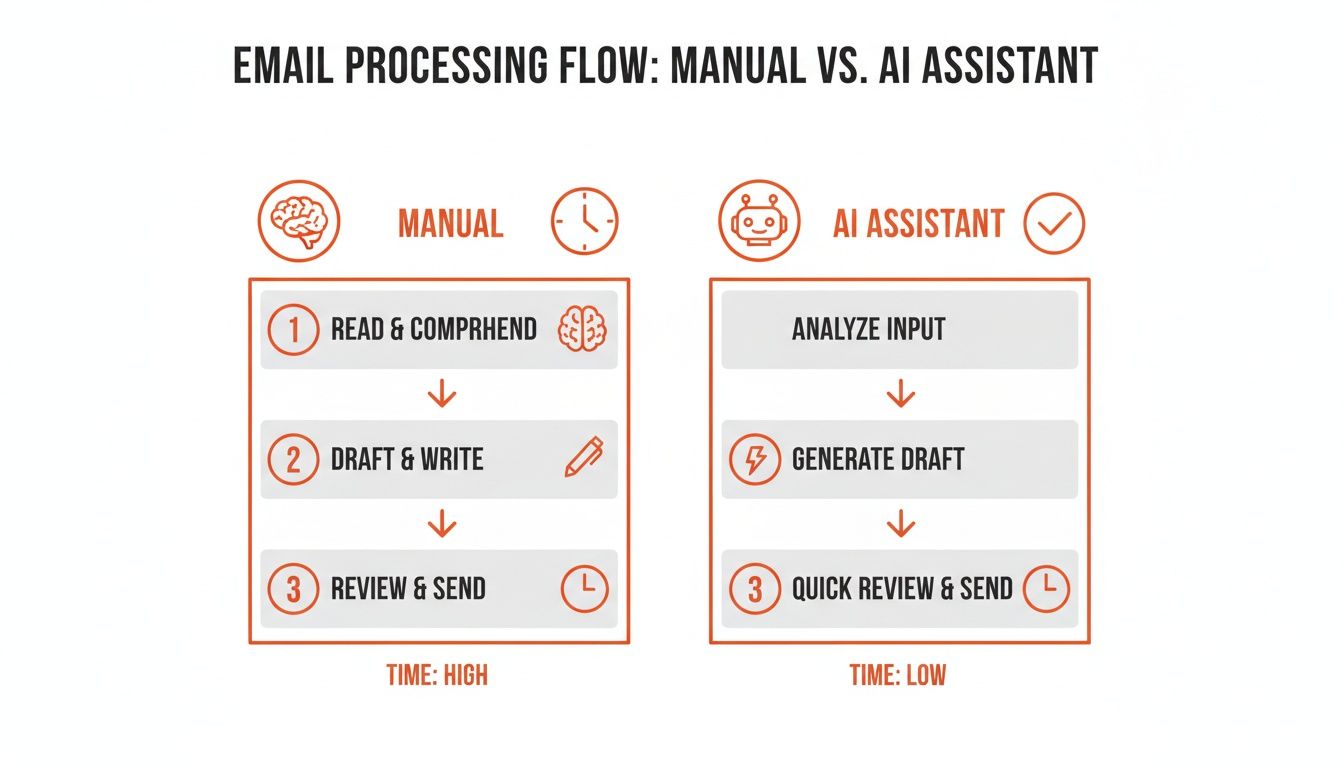
As you can see, the assistant handles the tedious work of gathering context and writing the first draft, turning a long, manual process into a simple review.
A Partnership Based on Feedback
Your voice profile isn't set in stone. It gets smarter and more accurate with every email you send, creating a powerful feedback loop. You’re always in control, and every action you take helps the AI become a better assistant.
Here’s how you’re constantly training it:
- Sending a draft as-is: This tells the AI, "You got it right! Do more of this." It reinforces the style it used for that draft.
- Editing a draft before sending: When you tweak a sentence or change a word, the AI pays attention. It learns your preference and applies that feedback to future suggestions for that recipient.
- Deleting a draft entirely: This sends a clear signal that the suggestion missed the mark, helping the AI understand what to avoid.
This ongoing learning means the assistant becomes more attuned to your personal style over time. It’s not about the AI taking over; it’s a partnership where you provide the final say and the AI handles the upfront work, saving you a ton of time.
Real-World Scenarios Where AI Assistants Add Value

It’s one thing to understand the theory behind an AI email assistant, but it’s another thing entirely to see how it can lighten your daily workload. So, how does this tech actually go from a neat idea to a practical tool that gives you back your time? The specific benefits really depend on what you do, but the goal is always the same: less time on email, more time for what matters.
And let’s be honest, the need for this has never been greater. As more of us work from home, email has become our primary lifeline. Projections even show that 30% of the workforce will be mostly remote by 2026, which means the flood of emails isn't slowing down.
For a solopreneur juggling 50+ emails daily, that can easily eat up over 12 hours a week. For a consultant, that’s thousands in lost billable work. It’s no surprise that AI assistants are becoming a go-to solution for this new reality.
Let’s look at how an ai powered email assistant helps a few different types of busy professionals.
For Founders and Solopreneurs
If you're a founder, you know that time is the one resource you can't get more of. Every minute you spend replying to routine emails is a minute you aren't spending on your product, your strategy, or your next big move. This is where an AI assistant steps in, acting like a team member you don't have to hire.
Think about your last product launch. Instead of manually chasing down beta testers for feedback, your assistant could draft personalized check-ins based on your earlier conversations. It can also tackle those first-touch customer support questions by drafting replies from your help docs, letting you focus on the bigger problems.
For a founder, an AI assistant is like having a communications intern who already knows your business inside and out. It handles the predictable communication, letting you stay focused on the unpredictable challenges of building a company.
Here are a few real-world tasks it can take off your plate:
- Investor Updates: Drafts professional, consistent updates for all your stakeholders.
- Customer Inquiries: Manages initial emails from new customers with quick, on-brand answers.
- Partnership Outreach: Writes personalized outreach drafts that sound just like you.
This isn’t about saving a few seconds here and there. It's about getting whole chunks of your day back for the work that only you can do.
For Consultants and Freelancers
As a consultant or freelancer, your time is money. Every hour spent on admin is an hour you can’t bill. An AI-powered email assistant helps you flip that non-billable time back into profitable work.
Just think about all the back-and-forth involved in managing a project. You’re sending progress reports, following up on invoices, and scheduling check-ins. Your assistant can draft all of these for you, fine-tuned for each client.
A follow-up email for Client A might need to be formal and full of data, while a check-in with Client B is more relaxed. The AI gets this, adapting its tone to match the relationship you've built. It’s like having someone keep your client comms humming along in the background, so you can stack your day with high-value work.
A Checklist for Choosing the Right AI Assistant
With a flood of new AI tools out there, how do you spot the ones that will genuinely help you manage your inbox? It’s a tough question. Not all AI email assistants are created equal, and picking the wrong one can saddle you with generic replies, security headaches, or just another clumsy app to juggle.
Think of this as your field guide. It’s a simple checklist to help you cut through the hype and find a tool that’s secure, effective, and actually feels like it was built for you.
1. Personalization and Voice Accuracy
Here’s the million-dollar question: does it actually sound like you? A great AI assistant learns your specific voice, tone, and even your favorite phrases. A bad one just pumps out robotic text that you have to rewrite from scratch, which completely misses the point.
Look for tools that offer per-recipient voice matching. This means the AI knows you don't talk to your CEO the same way you talk to your teammates. It’s what separates a basic AI writer from a true email sidekick.
A truly advanced assistant doesn't just generate text; it mirrors your communication style. It should feel like a suggestion you would have written yourself, not a template you have to fix.
2. Seamless and Unobtrusive Integration
An AI email assistant should simplify your life, not give you another app to manage. The best tools plug right into your existing email client, like Gmail or Outlook, without making you change a thing about how you work.
The whole process should feel invisible. A draft reply ought to just appear in your Drafts folder, as if you’d started it yourself. If a tool forces you to copy and paste from another window or deal with a clunky browser extension, it’s just adding more steps.
You want a solution that works quietly in the background, delivering help without getting in your way. You can see how the best AI email assistants compare on this and other features.
3. Data Privacy and Security First
You're handing over access to your inbox, so there's zero room for compromise on security. Any AI assistant worth considering must have a clear, transparent privacy policy. Make this a critical part of your evaluation.
Here are the absolute must-haves for security:
- Read-Only Access: The tool should only have permission to read emails to learn your style, not send, delete, or change anything without your explicit click.
- No Public Model Training: Your private data should never be used to train public AI models. This is non-negotiable.
- GDPR and Compliance: Look for compliance with data protection laws like GDPR. It’s a strong signal that the company takes privacy seriously.
- Data Deletion: You must have the power to disconnect your account and permanently erase your data whenever you want.
If an assistant's privacy policy is vague, hard to find, or confusing, walk away. It's a huge red flag.
4. Onboarding Speed and Immediate Value
How quickly can you get it running and see a real difference? Setting up a modern AI tool should be dead simple—we're talking a one-click connection to your email account. You shouldn't need to sit through long tutorials or a complex configuration.
A good assistant will start giving you useful drafts on day one. While its accuracy will improve over time as it learns from your edits, you should feel the main benefit almost instantly. If you have to wait weeks for the "magic" to happen, it’s probably not the right tool for you.
5. Transparent and Fair Pricing
Finally, let's talk about the price tag. Look for a clear subscription model without any confusing credit systems or hidden fees.
A company that’s confident in its product will usually offer:
- A Free Trial: You should be able to try the full-featured tool for at least a week to see if it fits your day-to-day.
- No Credit Card Upfront: A trial that doesn’t ask for a credit card shows the company is betting on the product's value, not on you forgetting to cancel.
- Simple Tiers: Pricing should be easy to understand, typically with a standard plan for most people and maybe a pro plan for power users with advanced needs.
Understanding Your Data Privacy and Security
Let's be honest—letting an AI into your inbox can feel like a big deal. You're right to be cautious. That’s why privacy and security shouldn't just be features; they have to be the foundation of any AI email assistant you consider.
A trustworthy tool is designed to make you feel more in control, not exposed. It should act as a helpful co-pilot, not an autonomous agent with free reign over your account. This means clear, non-negotiable boundaries on what the AI can and cannot do.
The Hard Lines a Secure AI Assistant Won't Cross
A responsible AI email assistant plays by a strict set of rules. Its purpose is to give you helpful suggestions without ever overstepping its bounds. Be wary of any tool that asks for more permissions than it absolutely needs to generate a draft.
Here are the red lines a secure assistant will never cross:
- Send emails on your behalf: The power to hit "send" must always belong to you. The AI's job is done the moment it places a suggestion in your Drafts folder.
- Modify or delete your messages: The tool should have no power to change your inbox. Its access is purely for analysis and drafting.
- Share or sell your data: Your email content is yours and should never be shared with or sold to third parties. Period.
- Train public AI models with your emails: Your private communications should never be fed into a global AI model that other people can use.
A truly secure AI powered email assistant is built on the principle of user control. You should always have the ability to disconnect the service and permanently delete all your data at any time, no questions asked.
This level of transparency is what separates a reliable tool from a potential liability.
Key Security Features to Look For
As the market for these tools grows—with projections showing the sector could reach between $1.9 billion and $2.8 billion by the mid-2030s—trust is becoming the most important currency. You can read more about the email assistant market trends to see how privacy has become a key factor for users.
To make sure your data stays protected, look for assistants that are upfront and clear about their security practices.
Read-Only Access
This is the most fundamental security measure. The assistant should only have permission to read your past sent emails to learn your writing style. It should be technologically blocked from doing anything else in your inbox.
End-to-End Encryption
From the moment your data is analyzed to when it’s stored, it should be completely encrypted. This ensures that even in the unlikely event of a security breach, your information remains unreadable and useless to anyone else.
GDPR and Compliance
Look for clear statements about compliance with major data privacy laws like GDPR. This shows a company's commitment to the highest data protection standards, no matter where you live. A straightforward, easy-to-read privacy policy is always a great sign of a trustworthy provider.
Getting Started with Your AI Email Assistant
So, you’re ready to get your inbox under control. The good news is that putting an AI powered email assistant to work for you isn't some huge, complicated project. The best tools are designed to give you back time, right away.
It all starts with a simple and secure setup. A privacy-focused assistant will ask for read-only access to your Gmail, which is usually just a one-click approval. You won't have to deal with any confusing settings or technical manuals.
Once connected, the AI starts learning from your sent mail. Think of it like a new apprentice studying how you communicate—your go-to greetings, your typical sign-offs, and the unique tone that makes your emails sound like you. This is how it learns to write drafts you’ll actually want to send.
Your First Week: Making the AI Smarter
Within a few hours, you'll see the first draft suggestions pop up in your Gmail Drafts folder. They're often surprisingly good from the get-go, but your feedback during the first week is what makes them truly great. This is your chance to train the AI to perfectly capture your voice.
To speed up the learning curve, just follow these simple habits:
- Glance at every draft. At the beginning, take a few seconds to review each suggestion. You'll quickly see what the AI gets right and where it needs a little guidance.
- Edit without hesitation. Don't be shy about making tweaks. Changing a word, rephrasing a sentence, or adding a personal touch is the most powerful feedback you can give. Every edit is a lesson.
- Send it or scrap it. If a draft looks good, send it. If it’s way off, just delete it. Both actions clearly tell the AI what to do more of and what to avoid entirely.
This partnership is what makes the assistant adapt to your style so quickly.
It Learns from You, Not the Other Way Around
The best way to think about this tool isn't as software you need to master, but as a partner that learns from you. You don't have to change how you work or open a new app. Everything happens right inside the Gmail interface you use every day.
An AI assistant's true power lies in its ability to adapt to your way of working. It operates quietly in the background, placing helpful suggestions where you can easily find them, without ever getting in your way or demanding your attention.
The goal is to be helpful but invisible. A great assistant starts handling the grunt work of drafting immediately, freeing you up to focus on the work that actually matters. If you're curious about the technology behind this, you can see how a dedicated AI email writer can personalize your communications.
By following these simple practices, you'll find your AI assistant quickly becomes an indispensable part of your day. It’s the fastest way to get your inbox—and your workday—back.
Got Questions? We've Got Answers.
Even after seeing what an AI assistant can do, it's natural to have a few questions about how it all works day-to-day. You’re probably wondering how this kind of tool actually fits into your daily routine.
Let's walk through some of the most common questions we hear from new users.
How Long Does It Take to Learn My Writing Style?
This is a big one. The good news is you'll see decent results almost immediately. The initial analysis of your sent emails usually takes just a couple of hours, so you’ll get well-structured drafts on day one.
But the real magic happens as you use it. The AI is constantly learning from your feedback. By simply editing a few drafts and sending the ones that nail your voice, you'll find the assistant gets incredibly accurate within the first week. The more you use it, the smarter it gets.
Will the AI Ever Send an Email Without My Permission?
Never. A trustworthy AI email assistant will never, ever have the ability to send an email for you. Its only job is to create a helpful draft and save it in your Drafts folder, where you can review it.
You are always in complete control. The final decision to edit, send, or delete a draft always rests with you. This ensures that no message ever goes out without your explicit approval.
This isn’t just a feature; it’s a fundamental rule. The assistant is there to be your co-pilot, not to take over the cockpit. You have the final say on every single word that leaves your inbox.
How Is This Different from Using Email Templates?
That’s a great question because it really gets to the heart of what makes this tool so powerful. Think of email templates as static, one-size-fits-all tools. Your "Follow Up" template is the same generic message every single time, no matter who you're emailing.
An AI assistant, on the other hand, is dynamic. It actually reads the conversation and understands the context, including your relationship with the person you're talking to.
This means the AI can:
- Adapt the tone: It knows to be more formal with a potential client than with a teammate you've worked with for years.
- Reference specific details: It can pull key points from the email thread to make your reply feel specific and relevant.
- Match your voice: The draft sounds like you wrote it, not like a generic script.
Simply put, templates are a blunt instrument. An AI assistant is a smart, adaptable partner that tailors its help to every unique situation.
Can I Use This with Email Providers Besides Gmail?
Right now, many of the best AI assistants are built specifically for Gmail. Focusing on one platform allows developers to really nail the integration, security, and overall experience before trying to support everything at once.
While some tools are expanding to other providers, you’ll often find that a tool designed exclusively for Gmail provides a much smoother and more reliable experience. It's always a good idea to check the tool's website for the most up-to-date list of supported email clients.
Ready to stop writing the same emails over and over? Draftery places perfect drafts that sound just like you right in your Gmail. Start your free 7-day trial and reclaim your time.