Master the Inbox Zero Method and Reclaim Your Focus
Let's get one thing straight: Inbox Zero isn't about obsessively keeping your email count at zero. If that’s what you thought, I don't blame you—it's a huge misconception. The real goal is to spend zero mental energy on your inbox when you're not actively working in it.
Think of it as closing all the open tabs in your brain.
Why Your Inbox Is Secretly Sabotaging Your Work
That sinking feeling you get when you open your inbox? It's not just a feeling; it’s a measurable drain on your focus and your bottom line. Over time, your email has morphed from a simple communication tool into a disorganized to-do list that anyone and everyone can add to.
The sheer scale of the problem is mind-boggling. By 2026, we're expecting a flood of 392.5 billion emails hitting inboxes every single day. For a busy founder, consultant, or team lead, that can easily mean wading through 50 to 100 messages daily, each one fighting for a slice of your attention.
This is the exact chaos that productivity expert Merlin Mann set out to solve when he created the Inbox Zero method way back in 2006.
The Real Cost of Email Clutter
It's not just the volume of email; it's the constant switching of gears that kills your productivity. Research shows the average professional wastes over 250 hours a year just managing their email. That’s more than six full work weeks you could have spent on deep, meaningful work.
Every time you glance at a notification, you’re pulled out of your flow. Getting back into that focused state takes time and energy you just don’t have to spare. It's a vicious cycle of distraction.
Inbox Zero was never about the number of messages in your inbox; it’s about the amount of your attention that’s in your inbox. The goal is to reclaim your mental bandwidth.
The biggest mistake I see people make is taking the name too literally. They get stressed trying to hit a "zero" count. But Mann's idea was much simpler: stop using your inbox as a catch-all for tasks, reminders, and files.
The Core Principles of Inbox Zero
At its heart, Inbox Zero is a sustainable process, not a perfect end state. It’s built on a few powerful habits that help you get ahead of your email instead of constantly reacting to it. Truly understanding these principles is the key to successfully managing email overload for good.
Merlin Mann's original philosophy really boils down to these four ideas.
| Principle | What It Really Means |
|---|---|
| Process to Zero | Don't let emails linger. Every message gets processed and moved out of the inbox, whether that means archiving, deleting, or sorting it. |
| One Point of Truth | Your inbox is a terrible to-do list. Actionable emails belong in your task manager or on your calendar—a single place where your work lives. |
| Batch Your Email | Stop checking email constantly. Instead, schedule two or three focused blocks a day to clear your inbox. This protects your concentration. |
| Decide Quickly | Every email demands a quick decision: Delete, Delegate, Respond, Defer, or Do. Clutter and anxiety come from putting off these decisions. |
When you look at it this way, adopting Inbox Zero feels less like a chore and more like a strategic decision to protect your most valuable asset: your attention. You're not just cleaning an inbox; you're designing a more focused, effective way to work.
Alright, let's get into the nitty-gritty of how this actually works. The philosophy of Inbox Zero is great, but it’s the daily actions that will get your inbox under control. This is where you stop letting email happen to you and start making decisive moves.
The entire system really boils down to five choices for every single message: Delete, Delegate, Respond, Defer, and Do. Once you internalize these, you’ll be able to process emails in seconds, not minutes. No more agonizing, no more letting things just sit there.
This decision tree is a great visual for how to think through each email. Everything has a place, and most of it doesn't belong in your primary inbox.
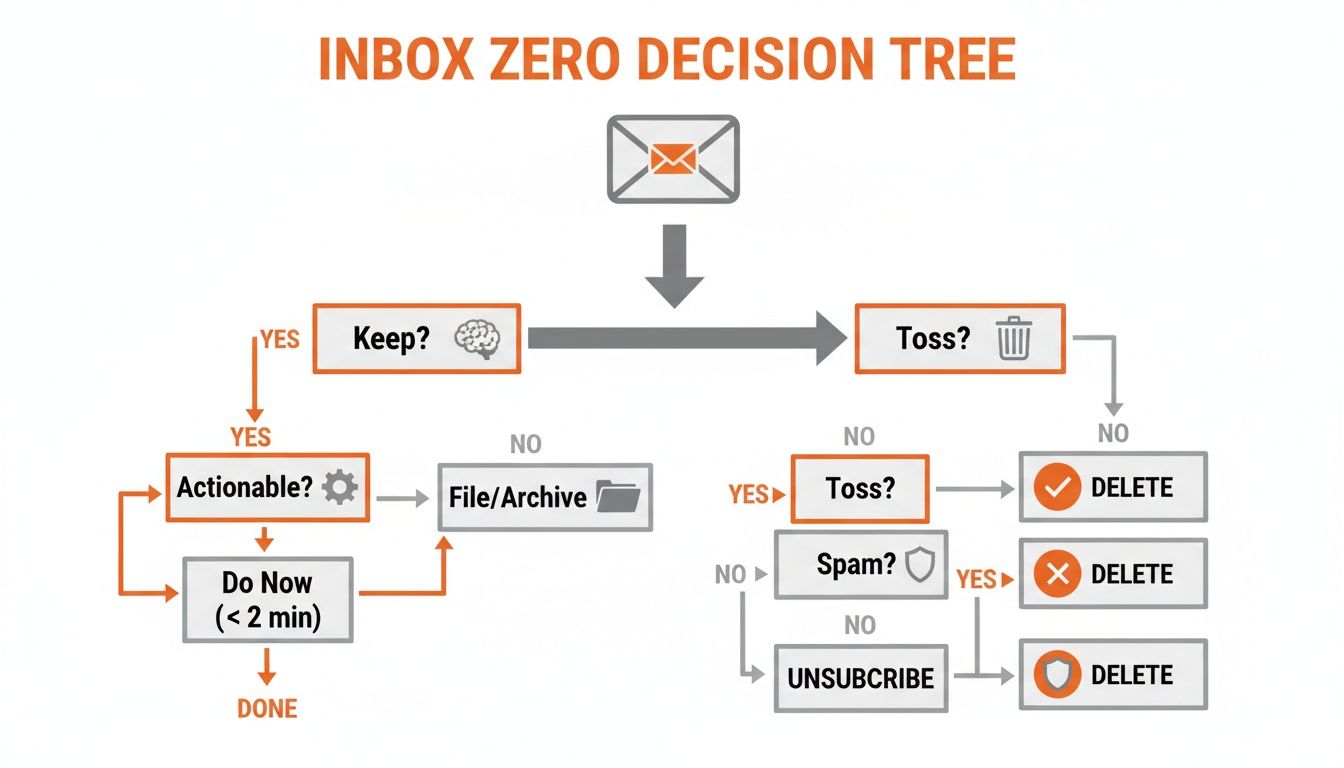
The goal is to get each email out of the inbox. It either gets tossed or sorted for a specific purpose. That's it.
Your New Favorite Button: Delete
This is your first line of defense, and you need to get comfortable with it. A huge chunk of what you receive is just noise—old promotions, CCs that don't concern you, and FYI emails that have served their purpose. Your delete key is the fastest path to a clean slate.
I want you to be ruthless. The temptation is to archive "just in case," but that just creates a digital hoarding problem. If it's not actionable and not a critical record you'll actually need later, get rid of it.
A game-changing habit for me was to aggressively unsubscribe. Every time a marketing email lands, I take 3 seconds to scroll and hit that "Unsubscribe" link. It’s a tiny investment of time that pays off forever by stopping the problem at the source.
Hand It Off: Delegate It
Not every email that lands in your lap is actually your responsibility. A key skill for any busy professional is knowing when to pass the ball. Delegating isn't just for managers; it's about getting the right task to the right person, whether that's a direct report, a teammate, or someone in another department.
When you forward that email, don't just send it off with a vague "FYI." Make the handoff crystal clear.
- Add Context: Why are you sending this to them?
- State the Action: What, exactly, do you need them to do?
- Give a Deadline: If it's time-sensitive, be specific.
For example, instead of just forwarding a client request, add a note: "Hey Jen, can you take this one? They need a quote for our standard package by EOD Thursday. Let me know if you have any questions." This tiny bit of front-loading saves a ton of back-and-forth later.
Quick Wins: The Two-Minute Rule
Some emails are just begging to be dealt with immediately. This is where the famous "two-minute rule" comes in: If you can read and reply to an email in under two minutes, just do it right then and there.
Tackling these quick tasks stops them from piling up and turning into a mountain of dread. A fast "Thanks, got it!" or "Approved, please proceed" takes seconds but clears an item from your mental to-do list for good.
I’ve found that so much of winning the email game is about speed. If you can build the habit of triaging an email in just a few seconds, you reclaim a massive amount of focus. The average office worker gets interrupted 11 times an hour—don't let email be the main culprit.
This quick-hit approach gives you momentum and a feeling of control, which, as BYU's Natalie Day has pointed out, can be a huge factor in reducing work-related anxiety.
Not Now, But Later: Defer It
Of course, many emails are important but simply can't be handled right now. These are the messages that haunt our inboxes because we’re afraid we’ll forget them. This is what the "Defer" action was made for.
Modern email clients are built for this. Gmail's "Snooze" feature is your best friend here. With one click, you can make an email vanish and reappear at a more logical time.
- Tomorrow morning as you plan your day.
- Next week when you're prepping for that project meeting.
- A specific date and time tied to an actual deadline.
If an email contains a big task that requires real focus, the best move is to get it out of your inbox entirely. Defer it by moving the task to your calendar or to-do list. Block off the time, archive the email, and trust that you've got it covered.
When It's on You: Do It (But Not in Your Inbox)
Finally, we have the emails that contain real work—tasks that are your responsibility and will take more than two minutes. These are your "Do" items. The absolute key here is to move them out of your inbox and into a proper task management system.
Your inbox is a terrible to-do list. It's a place for communication, not project management. As the team at Asana often points out, a huge percentage of email is junk, but the actionable items that remain need a proper home. Moving them to a task manager is how you ensure they actually get done.
This simple act gives you a single, reliable place to see all your work. It frees your inbox to do what it does best: send and receive messages.
Turning Gmail into Your Inbox Zero Command Center
It’s time to move from theory to action. Let’s get our hands dirty and build a sustainable Inbox Zero system right inside Gmail. You don't need a bunch of complicated add-ons; this is all about bending Gmail's built-in features to your will, creating a workflow that actually works for you.

The whole idea is to stop using your inbox as a messy, digital junk drawer. We'll set up a simple structure using Gmail's "labels" (their word for folders) that mirrors how you make decisions.
Set Up Your Core Action Labels
Your inbox should only be a temporary pit stop, not a permanent home for emails. We’ll create just a few key labels to give every email a proper place to go once you’ve decided what to do with it.
I recommend a little trick: start your label names with the "@" symbol. This pins them to the top of your folder list in the sidebar, so they're always easy to find.
Here's the simple, powerful setup I've used for years:
- @Action: This is your new to-do list. If an email requires you to do something, it goes here. Now your tasks are separated from all the other noise.
- @Waiting: This is for emails where you've passed the ball to someone else. You’ve delegated a task or are waiting on a reply. It's the perfect way to track those open loops without them cluttering your main view.
- @Reference: Think of this as your personal library. It's for anything non-actionable but important enough to keep—things like receipts, signed contracts, or key project documents.
This structure is heavily inspired by David Allen’s classic "Getting Things Done" (GTD) methodology. It’s built for one thing: making quick, decisive choices so you can process information without getting bogged down.
Embrace the Power of Batch Processing
If you adopt only one habit from this guide, make it batch processing. Stop letting email notifications run your day. Instead, you decide when to deal with email by scheduling specific blocks of time for it.
For most of us, two or three focused 20-30 minute sessions a day is plenty.
That constant "ping" of a new message is a focus killer. I've seen it firsthand—interruptions can happen every couple of minutes in a hyper-connected environment. The mental cost of getting back on track after each one is huge. Batching your email is the antidote; it turns a constant stream of distractions into a predictable, scheduled task.
Scheduling your email time breaks the cycle of constantly reacting to what's coming in. It gives you back long, uninterrupted stretches of time for the deep work that actually matters. For more ideas, check out our guide to the best Gmail productivity tools.
Automate the Sorting with Filters
Now for the fun part: making Gmail do the heavy lifting for you. Filters are your secret weapon for preventing clutter before it even hits your inbox. You can create rules that automatically label and sort incoming mail, sending it exactly where it needs to go.
Here are a few must-have filters to set up right away:
- Newsletters: Set up a filter for your favorite newsletters (or use keywords like "unsubscribe") to automatically apply a "Newsletters" label and skip the inbox. You can then read them all at once when you have a free moment.
- Notifications: Filter all those alerts from your project management tools, social media platforms, and other apps. Send them to a dedicated "@Notifications" folder to review in one quick batch.
- Calendar Invites: Create a filter to automatically archive calendar invites and updates after you respond. This is a simple trick that keeps your inbox remarkably clean.
Setting one up is easy. Just open an email you want to filter, click the three-dot menu, and choose "Filter messages like these." From there, you can tell Gmail what to look for and what to do, like "Skip the Inbox (Archive it)" and "Apply the label."
This simple system—labels for action, scheduled time for processing, and filters for automation—is the backbone of a true inbox zero method. It turns a chaotic inbox into a streamlined tool that supports your focus instead of stealing it. After all, when research shows the average professional checks their email up to 11 times per hour, you need a system designed to break that habit. Read more about how batching helps you focus on inmoat.com.
Using AI and Automation to Enhance Your Workflow

So you've wrestled your inbox into submission. You’ve mastered the core actions, you’ve got a system, and you’re feeling pretty good about the classic inbox zero method. But if you stop there, you’re leaving the biggest productivity gains on the table.
It’s time to bring in the force multipliers: smart automation and AI.
Think of it like this: your labels, filters, and batching schedules are a beautifully organized factory floor. AI assistants are the intelligent robots you bring in to handle the most repetitive and time-sucking assembly lines.
Supercharging Your 'Respond' and 'Do' Actions
The traditional inbox zero process is fantastic for triaging and organizing. But it still leaves you with the heaviest lift: actually writing the replies and doing the work requested in them. This is where modern AI email assistants change the game, turning a tedious manual process into a nearly automatic one.
These tools are built to tackle the ‘Respond’ and ‘Do’ steps with incredible speed. Forget the old-school, canned template responses that sounded so stiff and impersonal. The new breed of AI can generate nuanced, context-aware drafts that sound remarkably human—specifically, they sound like you.
This is where the real magic happens. Instead of staring at a blank page for every important reply, you start with a nearly finished draft. I've seen this single shift cut down a person's 'Respond' time by more than 50%. You get to focus your brainpower on reviewing and refining, not just writing from scratch.
The goal isn't to let a robot take over your communications. It's to eliminate the tedious 'first draft' phase of email, which is often where we procrastinate the most. AI gives you a running start on every single reply.
This simple change transforms the inbox zero method from a purely organizational system into a true productivity engine. You’re not just shuffling emails into folders more efficiently; you're actioning them faster than ever before.
How AI Drafts Accelerate Your Workflow
Let's walk through a real-world scenario. Imagine you open Gmail to tackle your morning email batch. With an AI assistant like Draftery.ai integrated, your entire workflow is different. Instead of opening an email, reading it, thinking, and then typing, you open the email and find a high-quality draft already waiting for you.
This completely changes the mental load. Your job shifts from "creator" to "editor"—a much faster and less draining role.
For example, when a potential client emails with a list of questions, the traditional process is a slog:
- Read the email and digest all the questions.
- Open a new reply window.
- Type out a greeting.
- Go through each question one-by-one, looking up information as you go.
- Write a closing and sign-off.
- Proofread everything and finally hit send.
Now, here's what that looks like with a good AI drafter:
- Open the email and find a pre-written draft answering all the questions.
- Review the draft for accuracy and tone.
- Make a few minor edits to add a personal touch.
- Click send.
This automated first pass is a game-changer, especially for busy professionals whose reputation hangs on the quality of their communication.
The Power of Per-Recipient Voice Matching
The biggest leap in AI email assistance in 2026 is the move away from generic, one-size-fits-all voices. Early tools made everyone sound like a cheerful but slightly robotic customer service agent. The best tools today, however, learn your unique writing style.
This is absolutely critical. An AI assistant should be an extension of your own professional voice, not a bland replacement for it.
Advanced systems analyze your sent mail to understand your vocabulary, your preferred level of formality, how you open and close emails, and even your emoji habits. More importantly, they learn how your tone shifts depending on who you're talking to.
You don't talk to your CEO the same way you talk to a close colleague, right? Your AI shouldn't either. I've seen this be particularly powerful for founders and solopreneurs. As some industry observers at inmoat.com have noted, it allows them to use AI for drafting replies that instantly adapt to the recipient—formal for an investor, casual for a teammate—with drafts appearing right inside Gmail.
Manual Inbox Zero vs AI-Powered Inbox Zero
The synergy between the classic method and new technology becomes crystal clear when you put them side-by-side. An AI assistant doesn't replace the Inbox Zero philosophy; it accelerates it.
Here’s a quick comparison showing how a tool like Draftery.ai works with the system you've already built.
| Task | Manual Method | Draftery.ai Method |
|---|---|---|
| Sorting | Use filters and labels to sort incoming mail. | Same. Filters and labels are still foundational. |
| Responding | Manually type out every reply, even quick ones. | Open the email to find a draft already written in your voice. |
| Following Up | Manually schedule reminders to follow up on delegated tasks. | AI can identify emails needing a follow-up and pre-draft a polite nudge. |
| Time Cost | Reduces sorting time but reply time remains high. | Dramatically reduces both sorting and reply time. |
By layering AI onto a solid organizational system, you truly get the best of both worlds. You have a structured, clutter-free inbox and the speed to process actionable items with minimal effort. You can learn more about how to get the most out of these tools in our complete guide to AI for email management.
The future of the inbox zero method isn't just about managing email; it's about automating the work within it.
Maintaining Inbox Zero for the Long Haul
Getting your inbox to zero for the first time feels incredible. It's a huge win. The real challenge, though, is keeping it that way.
Maintaining the inbox zero method isn't about being perfect. It’s about building a system that can handle the reality of your work life—a busy week, a much-needed vacation, or just one of those days where everything is on fire.
The big mindset shift is moving from a one-time cleanup project to a daily practice. This is the exact spot where most people stumble. They do the hard work of clearing out thousands of emails, but without a plan for daily upkeep, they slide right back into that familiar state of email chaos.
The Weekly Review Ritual
One of the best habits you can build for long-term success is a weekly review. This isn't just another chore to add to your list; it's a dedicated moment to reset your entire system. Think of it as a ritual, not a routine.
Block out 15-20 minutes at the end of your week—Friday afternoon is a popular choice. In this window, your only job is to process what's left and tidy up your system.
- Process the leftovers: Anything still in your inbox gets processed and moved to
@Action,@Waiting, or@Reference. Get it to zero. - Scan your
@Actionfolder: Are these tasks still on your plate? Did you finish any? Archive what's done. - Glance at your
@Waitingfolder: Take a quick look. Does anything in there need a gentle nudge or a follow-up?
This simple act prevents a few stray emails from snowballing into an avalanche. You get to start the next week with a truly clean slate, which does wonders for reducing that low-grade anxiety that comes from digital clutter.
How to Handle the Inevitable Backlog
Let's be realistic: life happens. You’ll go on vacation or get pulled into a project that demands all your attention. You'll come back to a mountain of emails.
Don't panic. And whatever you do, don't abandon the system.
Instead, find your calendar and book a 60-90 minute "clearing block." This is triage time. Be aggressive. Sort by sender to mass-delete newsletters and notifications. I usually tackle the oldest messages first, since many of them have lost their urgency and can be archived or deleted immediately. The goal isn't to do the work in those emails, but to process everything until your inbox is empty again.
Maintaining your system is really about respecting the boundaries you’ve already set for yourself. If you scheduled time for email, stick to it. If you committed to a weekly review, don't let it slide. Consistency is what turns this method into a permanent, stress-reducing asset.
Turning the Method into a True Habit
Making this new workflow stick requires discipline, especially at the start. Studies show it can take an average of 66 days for a new behavior to become second nature, but you'll likely start feeling the benefits in as little as 18 days. The real work is investing those 2-5 seconds to make a decision on every email as it arrives instead of putting it off.
New tools can help lock in the habit. For example, AI assistants like Draftery.ai are designed to accelerate this process. It can auto-draft replies for you—in your specific voice and tailored to the recipient—and have them waiting in your drafts folder before you even open the email. It's a system built by a solopreneur who was drowning in email himself. You can find more data about email habit formation on readless.app.
Ultimately, embracing the inbox zero method is a journey. By setting up a weekly review, learning to handle backlogs without the stress, and committing to the daily practice, you can finally transform email from a source of anxiety into a powerful tool that you actually control.
Common Questions About the Inbox Zero Method
Even with the best intentions, switching to a new system like Inbox Zero can feel a bit daunting. I’ve seen a few common questions pop up time and again from people just starting out, so let's tackle those head-on. Getting these cleared up will help you implement the system with confidence.
Does Inbox Zero Mean Literally Zero Emails?
This is easily the biggest myth, so let's bust it right now. The simple answer is no. Reaching Inbox Zero isn’t about having a completely empty inbox 24/7.
The "zero" actually refers to the amount of mental energy you spend thinking about your inbox. The real goal is to get to a point where every single email has been processed. Nothing is left sitting there, pulling at your attention. It's about decisiveness, not just deletion.
This method is less about achieving a perfectly empty inbox and more about the "philosophical practice" of learning what distractions you allow into your workflow. It's about taking back control.
Some days you might end with five emails you’ve intentionally left to handle tomorrow. Other days, it might actually be zero. The number doesn't matter. What matters is that you've made a conscious choice about every message, freeing your mind to focus on other work.
How Much Time Does This Actually Take?
I'm not going to lie—the initial clean-out can be a project. If you're starting with thousands of messages, you'll want to block off a few solid hours to power through that backlog. But think of it as a one-time investment.
The real payoff comes in the day-to-day. Daily maintenance, done in a couple of focused blocks, takes just a few minutes. This is a huge time-saver compared to the constant distraction of checking your inbox all day. With the average professional receiving around 120 emails per day, reacting to each one as it arrives is a guaranteed way to kill your productivity. A structured system is simply more efficient.
Is This Realistic for People Who Get Hundreds of Emails?
Yes, and in fact, those are the people who need it most. When you're drowning in emails, a disciplined process isn't just a nice-to-have; it's a lifeline.
If you’re dealing with that kind of volume, you just need to lean more heavily on the power-user features of the system. This is where it really shines.
- Aggressive Filtering: Set up rules that automatically archive newsletters, notifications, and FYI emails. If it doesn’t require your direct action, it shouldn't be in your primary inbox.
- Templates and Snippets: For all those questions you answer over and over, create pre-written responses. This cuts reply time down to seconds.
- Automation: This is the real game-changer. Use an AI email assistant to draft your replies. Instead of typing everything out, you just need to review, tweak, and send. It makes a high volume of email completely manageable.
The beauty of the inbox zero method is that it scales. The more email you get, the more valuable a structured, automated system becomes. You're not working harder; you're just using a much smarter process to handle the load.
Ready to stop writing email replies from scratch and cut your inbox time in half? Draftery automatically generates high-quality drafts in your unique writing voice, right inside Gmail. Start your free trial and experience an AI assistant that truly sounds like you.