Zero Inbox Method: Clear Your Email Faster and Stress-Free
Let’s be honest, the term "zero inbox" has been misunderstood for years. It doesn't mean your inbox is always empty. That’s a myth, and chasing it will only lead to frustration.
The real goal of the zero inbox method is to stop letting your email control your day. It’s a decision-making framework, a system that puts you back in the driver's seat.
Beyond the Myth of an Empty Inbox
Think of it this way: your inbox has become a to-do list that anyone in the world can add to. That’s a recipe for chaos. The zero inbox method, first made popular by productivity expert Merlin Mann almost two decades ago, is about reclaiming that space. It’s about spending less mental energy thinking about your email and more time actually getting things done.
You’re not just trying to hit a magic number. You're building a defense against the constant stream of digital noise that pulls you away from what really matters.
A System for Decisive Action
At its heart, the system is about making a quick, decisive choice for every single email that arrives. You have five simple but powerful options.
This simple triage process is what keeps your inbox from overflowing and turning into a source of stress. Each email gets a destination, and none of them are allowed to just sit there demanding your attention indefinitely.
| Action | Description | When to Use It |
|---|---|---|
| Delete/Archive | Get rid of what you don't need. Archive anything you might need to reference later. | Use this for newsletters you've read, FYI messages, and anything that isn't actionable for you. |
| Delegate | Forward the email to the person who should actually handle it. | Perfect for requests that fall outside your role or that a team member is better equipped to manage. |
| Respond | If a reply takes less than two minutes, do it immediately. | Knocking out quick replies prevents small tasks from piling up and clogging your to-do list. |
| Defer | Move emails that need more thought or a longer response out of your inbox. | For complex questions or tasks. Put it in a separate "Action" folder or add it to your task manager. |
| Do | If the email contains a task that takes less than two minutes, do it now. | This is for quick actions like confirming a meeting, signing a document, or making a fast decision. |
Once you’ve taken one of these five actions, the email is out of your inbox and out of your mind. It’s a simple loop: open email, decide, and act.
This isn’t just a nice-to-have system; it’s becoming a necessity. By 2026, experts predict a mind-boggling 392.5 billion emails will fly back and forth every single day. For founders and consultants who already spend over 250 hours on email each year, that lost time is a massive financial drain. You can see more data on these productivity trends at Readless.
The real "zero" in Inbox Zero isn't about the number of messages. It's about the amount of time and attention your brain spends in your inbox.
Ultimately, this isn’t about being rigid. It's a flexible framework built for busy professionals—founders, consultants, and leaders—who need to protect their most valuable resource: their time. It’s your ticket to turning email from a daily chore into a tool that works for you, not against you.
Setting Up Your Digital Command Center
If you're serious about reaching Inbox Zero, your email can't just be a place where messages go to die. It needs to become your command center—a clean, organized space built for making quick decisions, not for endless, agonizing filing.
The single biggest mistake I see people make is overcomplicating things with dozens of folders or labels. It seems smart, but it backfires. Every time an email lands, you waste mental energy deciding where it belongs. The truth is, a minimalist system is always faster and far more likely to stick.
The Foundation: A Simple, Action-Based Structure
Forget about creating a perfect, complex library of folders for every project or client. You only need a few core destinations for emails that have been processed out of your inbox. This setup is all about action, not archival perfection.
Here’s a dead-simple structure that works like a charm in both Gmail (with labels) and Outlook (with folders):
- @Action Required: This is your holding pen for anything that needs a proper response or will take more than two minutes to handle. Think of it as your high-priority to-do list, right inside your email.
- @Waiting For: Perfect for when you've passed the baton. If you've delegated a task or are waiting on a reply before you can move forward, park the email here. It instantly becomes your follow-up file, so nothing slips through the cracks.
- Archived (All Mail): This is where everything else goes. Once you've read an email and it requires no further action, just archive it. Don't delete anything unless it's pure junk.
Ever wonder about the "@" symbol? It's a simple little hack. Adding it to the front of your label or folder names forces them to the very top of your list, keeping them visible and easy to access.
The goal isn't to build a flawless digital archive of every email you've ever received. It's to clear your inbox so you can actually focus. Learn to trust your email's search function; it's infinitely faster than digging through folders yourself.
Automating the System with Rules and Filters
Creating the folders is just step one. The real magic happens when you use filters (or "rules" in Outlook) to automate most of the sorting for you. It's a native feature in every email client, but so few people use it to its full potential. To really get the most out of this, check out some of the top-tier Gmail productivity tools in our guide.
For example, you can create a rule that finds every email from "alerts@notion.so" or "updates@asana.com," applies a "Project Updates" label, and automatically archives it, skipping the inbox entirely. You can also create filters that star any incoming email from your boss or your top 5 clients, making sure they pop.
By building this simple structure and then automating how low-priority mail gets filed, you're essentially creating a clean slate for yourself. Your inbox stops being a source of stress and becomes what it was always meant to be: a station for processing new information, ready for you to tackle with speed and clarity. This setup is non-negotiable if you want to maintain Inbox Zero for the long haul.
A Repeatable Workflow for Email Sanity
If you've ever spent a whole Sunday clearing out your inbox, only to watch it spiral out of control by Wednesday, you know the problem. A one-time deep clean doesn't work. The real solution is building a calm, repeatable system that makes email management a predictable habit, not a chaotic chore.
The cornerstone of this system is something called batch processing. Instead of letting every new email pull you away from what you're doing, you carve out specific, focused blocks of time to deal with your inbox. It’s a simple shift, but it puts you back in the driver's seat.
The Daily Triage Routine
A simple daily rhythm can completely transform your relationship with email. It keeps messages from piling up and gives you a real sense of control.
I’ve found a three-touchpoint system works wonders:
- Morning Session (25 minutes): Before diving into your biggest tasks, tackle everything that came in overnight. This is your main processing block. Delete, delegate, defer, or handle anything that takes less than two minutes. The goal is to start your day with a clear inbox and a clear mind.
- Mid-Day Check (10-15 minutes): Think of this as a quick sweep, not a deep dive. Scan for anything genuinely urgent that needs a fast reply. It’s a rapid-fire session to keep things from becoming emergencies later.
- End-of-Day Sweep (15 minutes): One last pass to archive, sort, and reply to the day's remaining messages. This is your ticket to logging off with a clean slate, so email anxiety doesn't follow you home.
This whole process is about flow. Your inbox isn't a destination; it's a temporary sorting station where emails pause before being moved to their proper place.
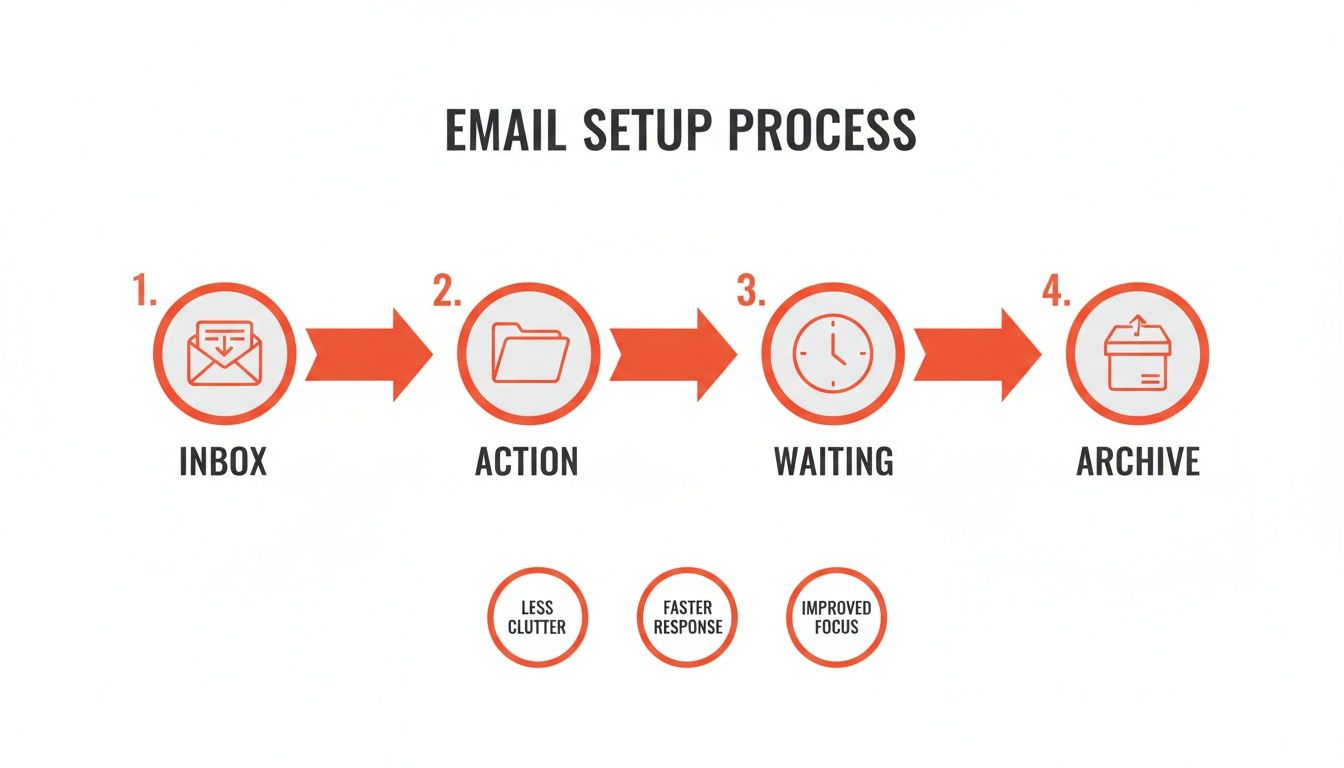
As you can see, the inbox itself stays clear because everything is systematically moved to an action, waiting, or archive folder.
Staying Disciplined in a World of Distractions
Honestly, the hardest part is breaking the habit of constantly checking your email. With the average professional getting around 120 emails a day, each notification is a tiny interruption that shatters your focus.
The most powerful move you can make is to turn off all email notifications—on your desktop, on your phone, everywhere. You control when you check email, not the other way around.
You also need to set some ground rules with your team. A quick "Hey team, I check my email a few times a day, so for anything truly urgent, please call or send a direct message" works wonders. If you're still drowning in the sheer volume, our guide on how to manage email overload has some great strategies for stemming the tide.
At the end of the day, a repeatable workflow is just a ritual you commit to. It’s what turns the zero inbox method from a stressful, one-off project into a sustainable practice that gives you back your time and attention.
Supercharge Your Workflow With AI And Automation
Having a rock-solid manual system for your inbox is a great starting point. But if you’ve followed the steps so far, you’ve probably realized the real bottleneck isn't sorting email—it's the time you sink into actually writing replies.
This is where you can get a huge chunk of your day back. Pairing your organized inbox with smart automation is the key to true efficiency.
The easy wins are templates, or what Gmail calls "canned responses." You should absolutely be using them. Instead of typing out "Thanks for getting in touch, here’s a link to my calendar" five times a day, you can pop in a template and be done in seconds.
But that only scratches the surface. Real automation addresses the most time-consuming task of all: writing thoughtful, personalized responses. And that’s where AI assistants have become a complete game-changer.
The Rise of AI Email Assistants
Modern AI email tools like Draftery.ai are designed to do more than just offer generic sentence suggestions. They solve the core problem of email overload by learning your specific writing style from your past emails. The result? It can generate complete, high-quality drafts that sound like they came directly from you.
Think about this scenario: A key client sends you an email with a few detailed questions. Before you've even had a chance to open it, an AI assistant has already gotten to work. It has:
- Read the new email and the entire conversation that came before it.
- Analyzed your past communication style with this specific person.
- Written a complete reply in your voice, making sure to address every question.
- Placed the finished draft right in your Gmail drafts folder, waiting for you.
When you finally check your email, a nearly perfect response is already there. All you need to do is give it a quick review, maybe make a small tweak or two, and hit send. This elevates the Inbox Zero method from a simple sorting system into a powerful response engine.
The real power of AI isn't just speed; it's authenticity at scale. It allows you to maintain personal, high-quality communication even when you're managing a high volume of messages.
For anyone in a busy role—founders, consultants, executives—the time saved is staggering. The numbers tell the story. Early pilots with Microsoft Copilot found that users were reading 11% fewer emails, and some teams reclaimed up to 45% of their time spent on email. For professionals who spend 250+ hours a year in their inbox, tools like Draftery that generate replies in your own voice can dramatically cut that down, with pilots showing a 50-300% ROI over three years. You can find more data on how AI adoption is reshaping inbox management on Adoptify.ai.
How AI Learns to Write Like You
The secret behind this isn't just a fancy template. Tools like Draftery go way beyond a generic "professional" tone by building a unique voice profile just for you. It does this by analyzing hundreds of your previously sent emails.
The AI picks up on all your personal quirks, including:
- Greetings and Sign-offs: Do you prefer a casual "Hey" or a more formal "Hi"? Do you sign off with "Best," or "Cheers"?
- Formality Level: It learns how your tone naturally shifts when you're writing to your CEO compared to a close teammate.
- Vocabulary and Phrasing: The AI identifies the specific words, phrases, and sentence structures you lean on.
- Even Emoji Use: It even learns whether you're someone who likes to add a smiley face or if you keep your communication strictly professional.
This is what allows the AI to write a draft to your boss that sounds respectful and to the point, and another one to a collaborator that feels more casual and friendly.
When you combine this kind of automation with the foundational Inbox Zero system, you’re not just clearing your inbox anymore. You’re getting your most valuable resource back: your time. If you want to go deeper, check out our complete guide on using AI for email management.
Overcoming Common Roadblocks and Resistance
Let's be honest: switching to an Inbox Zero system is less about software and more about psychology. It's a change in your habits, and that's where the real resistance comes in. For years, your brain has been wired to see your inbox as an endless, urgent to-do list. Breaking that cycle takes real, conscious effort.
One of the biggest mental blocks I see is the fear of missing out (FOMO). What if you archive something you’ll need next week? What if you declare "email bankruptcy" on 10,000 unread messages and miss that one golden opportunity? The anxiety is real, but it’s almost always overblown.
The key is to trust your new system, not your memory. The whole point of Inbox Zero is knowing that anything truly important has been moved to a dedicated action folder or your task manager. The rest isn't gone—it's just safely archived and completely searchable.
This isn't a new struggle. Back in 2011, the CEO of a major IT firm tried to ban internal email across 40 countries to push people toward modern tools. The backlash was huge. People are creatures of habit, and they saw it as a disruption, not an upgrade. Fast forward to today, with a projected 392.5 billion daily emails by 2026, and it's clear we can't keep doing things the old way. You can find some fascinating history on this resistance to abandoning traditional email habits on strategy-business.com.
Tackling the Initial Backlog
Staring at an inbox with thousands of emails feels paralyzing. The idea of sorting through them one by one is enough to make anyone give up before they even start. This is where you need a clean slate.
Forget about sorting every single old email. It's time to "declare email bankruptcy."
- First, create a new folder. Call it something like "Old Inbox" or "Archive [Today's Date]."
- Next, head to your inbox, select every single email in there. Yes, all of them.
- Finally, just drag the entire batch into that new folder.
That’s it. Your inbox is empty. It feels radical, I know, but it's also incredibly liberating. You can start fresh with your new system today, without the weight of a decade's worth of digital clutter holding you back. If someone emails you about an older thread, a quick search will pull it right up.
Breaking Old Habits and Building Trust
The toughest part of sticking with Inbox Zero is fighting the muscle memory that has you checking your email every five minutes. Each notification is a tiny dopamine hit, creating an addictive loop that completely wrecks your focus. You have to break that cycle intentionally.
Here are a few things that have worked for me and countless others:
- Kill your notifications. On your desktop, on your phone—everywhere. You need to be the one who decides when it's time to check email, not the other way around.
- Start small. Don't try to go all-in at once. Just commit to one 20-minute processing session in the morning. Once you see that the world doesn't end, you'll naturally feel less anxious.
- Lean on your "Waiting For" folder. This folder is your safety net. By reviewing it once a week, you'll see that delegated tasks aren't getting lost, which builds the confidence you need to let go.
Getting over these initial hurdles is all about giving yourself permission to work in a smarter way. It’s about trusting that a deliberate, systematic approach is far more reliable than being in a state of constant, reactive panic.
A Few Common Questions About Getting to Inbox Zero
Alright, so the idea of Inbox Zero sounds great in theory. But what happens when a real-life, chaotic Monday morning hits your inbox? It's one thing to read about a system, but it's another thing entirely to put it into practice when emails are pouring in.
Let's walk through some of the questions that come up time and time again when people start this journey.
How Much Time Should I Actually Spend on Email?
There’s no perfect number for everyone, but I’ve found a great starting point is to block out two or three 25-minute sessions on your calendar each day. This works beautifully with methods like the Pomodoro Technique, since it forces you to focus intensely instead of constantly glancing at your inbox. I usually do one session first thing, one around lunch, and a final one to wrap up the day.
The most important part? Treat these blocks like real meetings. If you don't, you'll slip right back into the old habit of reacting to every single notification. You can always tweak the time or frequency later as you get a better feel for your email volume.
The point isn't just to have a clean inbox. It's to get there without wasting your entire day. If email is still eating up hours, something's wrong. These focused sessions are how you take back control.
What Do I Do With Emails That Are Actually Big Tasks?
This is where most people get tripped up. An email lands, and it contains a project that will take way more than two minutes. The temptation is to just leave it sitting in your inbox as a reminder. Don't do it. Your inbox is for sorting mail, not for managing your to-do list.
When a bigger task comes in, it needs to be deferred properly. Here’s what that looks like in practice:
- First, get the email out of your inbox. Move it to your "@Action Required" folder so you can find it later if needed.
- Then, immediately add the actual task to your project management tool. Whether you use Asana, Todoist, or just your calendar, get it out of your head and into your trusted system.
- Make sure to add a deadline and any other context you need. You can even drop a link to the original email thread right in the task description.
Keeping your inbox and your task list separate is the key discipline that makes this whole system work. It keeps your inbox clear and ensures nothing important gets buried.
Seriously, Is It Safe to Just Archive Everything?
Yes, absolutely! Trusting the archive button is probably the most freeing part of the whole process. So many of us were taught to build elaborate systems of folders and sub-folders, thinking it was the only way to stay on top of things. All that really does is create more work and more friction.
Think about it. Modern email clients like Gmail have search functions that are incredibly powerful. It's almost always faster to search for "invoice from John Smith" than to click through Clients > S > Smith, John > Invoices > 2024 to find what you're looking for.
Your archive is just one giant, searchable filing cabinet. You don't need to organize what's inside—you just need to trust that it's all there. Once you start archiving everything that doesn't need an immediate reply or action, your inbox becomes a clean, focused workspace again.
Ready to stop writing emails and start reviewing them instead? Draftery learns your unique writing style and automatically places ready-to-send drafts in your Gmail. Stop the manual work and start your free trial.