Master Your Inbox: AI Email Assistant Gmail Guide 2026
Professionals spend 250+ hours per year on email, and the upside of ai email assistant tools is no longer theoretical. Reviews summarized by Virtual Workforce's 2025 comparison of Gmail AI assistants report gains ranging from about 35% to 50% depending on the tool and use case. That's the difference between email being a background task and email becoming a part-time job.
I care about this category for a simple reason. Most inbox tools save a few keystrokes, but they still leave you doing the hard part. You still have to remember the thread, recover the context, choose the right tone, and switch your voice depending on who's on the other end.
That last part is a common point of disappointment. A generic AI can sound polished. It usually can't sound like you writing to this specific person. And in real work, that's what matters.
Why Your Inbox Needs a Co-pilot
Email drains time in small slices. Five minutes to answer a client. Ten minutes to find an old promise in a thread. Three more to rewrite a sentence so it sounds less blunt. By the end of the week, your inbox has eaten hours you meant to spend on work that moves things forward.
That's why I think of an ai email assistant gmail setup as a co-pilot, not a writing toy. A good co-pilot doesn't take over the plane. It handles routine workload, keeps context in view, and helps you move faster without getting sloppy.
For busy professionals, the problem isn't typing speed. It's decision fatigue. Every reply asks the same hidden questions: Who is this person? What did I promise them? How formal should I sound? Do I need a short answer, a warm answer, or a careful answer?
The hidden cost of context switching
If you're a founder, consultant, or manager, email isn't separate from your job. It is your job in miniature. Sales follow-ups, approvals, support replies, hiring conversations, vendor questions, investor updates. They all arrive in the same inbox, but they require different versions of you.
That's where people usually start looking for systems and habits. A practical place to tighten the basics is Pitch Deck Scanner's tips for VCs, especially if your inbox mixes high-stakes conversations with constant inbound noise.
Practical rule: If your inbox forces you to reconstruct the same context again and again, you don't have an organization problem. You have a workload design problem.
What a co-pilot changes
A useful assistant helps in three ways:
- It reduces recall work. You don't have to reread a long thread to remember what matters.
- It reduces drafting work. You start from a solid draft instead of a blank box.
- It reduces tone risk. You're less likely to send a message that sounds off for the relationship.
The last point gets overlooked. Most communication mistakes don't come from bad grammar. They come from using the wrong voice for the wrong person.
What Is an AI Email Assistant for Gmail
The easiest way to understand an AI email assistant for Gmail is to compare it to a sharp executive assistant who has studied how you write. Not just your vocabulary. Your habits. Your pacing. Your default level of warmth. How direct you are with coworkers versus clients. How you close a message when you're trying to move something forward.
Basic email tools never did that. Spellcheck fixes errors. Templates repeat the same structure. Gmail's older suggestions gave you small response snippets. Modern assistants can read the thread, infer what needs to happen next, and prepare a full reply draft.

From snippets to full assistance
Google's own timeline is a good example of how fast this category matured. In 2012, Google launched Smart Reply. By 2023, it introduced Help me write in Gmail for Workspace Labs users, shifting from short suggestions to full-draft generation, as described in Google Workspace's Gmail AI overview.
That jump matters. A one-line suggestion is helpful when the answer is obvious. It's much less helpful when the email involves nuance, tradeoffs, or relationship context.
If you want a broad overview of how the category is evolving, Robotomail's guide to autonomous email solutions is useful because it frames these tools as workflow systems, not just text generators.
What people often confuse
Readers usually mix up four different things:
Autocomplete
This predicts your next few words.Smart reply buttons
These offer short canned responses like “Sounds good.”Templates
These save reusable structures, but they don't understand the current thread.AI drafting assistants
These read context and generate a reply that fits the conversation.
That fourth category is the common understanding when searching for ai email assistant gmail.
A more advanced version goes one step further. It doesn't just write in a generally professional tone. It learns how your communication changes by recipient. That's the difference between “write this politely” and “write this the way I usually answer this person.”
For a deeper look at that distinction, this guide on Google email assistant workflows is a helpful companion.
A template repeats your words. An assistant tries to repeat your judgment.
How Modern AI Assistants Learn Your Voice
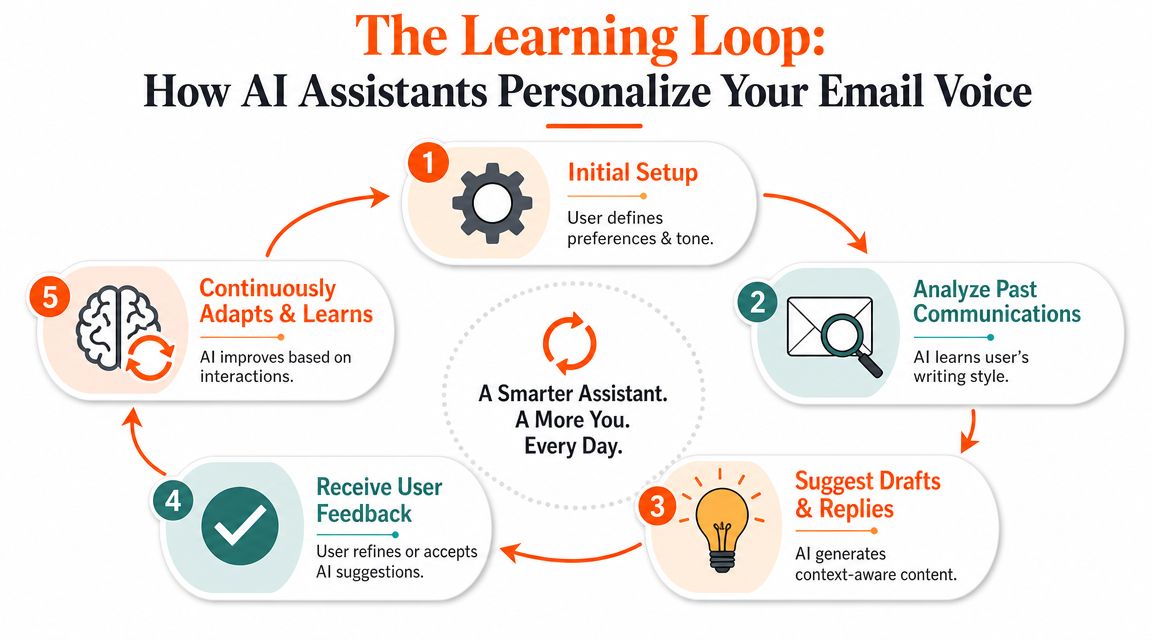
The part that feels magical usually isn't magic. It's pattern recognition plus context. The strongest assistants learn from three inputs at once: your past writing, the relationship with the recipient, and the current thread.
Google has shown how much native Gmail AI has expanded. In the Gemini era, Gmail can summarize long threads, answer inbox questions with AI Overviews, and generate contextual replies through Help Me Write, Suggested Replies, and Proofread, according to Google's overview of Gmail entering the Gemini era. That tells you the category has moved beyond autocomplete into retrieval and drafting.
First, the assistant studies your sent mail
Think of your sent folder as your writing fingerprint. It contains patterns you probably don't notice yourself.
A system can look for things like:
- Formality level such as whether you write “Hi,” “Hello,” or jump straight into the point
- Sentence style such as short direct replies or longer explanatory notes
- Warmth markers like thanks, softeners, sign-offs, and emoji habits
- Structural habits such as bullets, numbered steps, or one-paragraph answers
Tone isn't a setting you toggle once. It's a bundle of habits.
Then it learns the relationship, not just the style
This is the piece most tools miss.
You probably don't write the same way to your cofounder, your biggest client, and a new vendor. Even if your personality is consistent, your relationship context changes the draft. With one person, you're concise and blunt. With another, you add more reassurance. With another, you use more detail because they care about process.
That means true personalization is not “make it friendly” or “make it formal.” It's closer to this:
This recipient usually gets short replies, low ceremony, and a direct ask in the final sentence.
That kind of modeling is much more useful than generic tone sliders.
Finally, it grounds the draft in the live thread
An email assistant also has to understand what's happening right now. Otherwise it writes plausible nonsense.
A good system checks the thread for facts, unresolved questions, promised follow-ups, dates, names, and the latest message state. Then it combines that with your style profile to produce a reply draft that belongs in this conversation.
That's why retrieval matters so much. Without it, the assistant sounds smooth but misses specifics.
If you want to compare how writing-focused tools approach this problem, this page on an AI email writer is worth browsing.
A simple mental model
It's like cooking from three ingredients:
| Input | What it contributes | Why it matters |
|---|---|---|
| Past emails | Your voice | Makes the draft sound like you |
| Recipient history | Your relationship style | Adjusts how you talk to this person |
| Current thread | The facts of the moment | Keeps the reply relevant and accurate |
Without all three, the result is usually generic.
Key Benefits Time-Crunched Professionals Notice
Professionals can spend hundreds of hours a year in email. That is why the first benefit people notice is simple. Gmail stops feeling like a place where work goes to stall.
Time savings matter, but speed is only the visible part of the change. The bigger shift is that the assistant starts acting like a reliable second set of hands. It prepares a solid draft, keeps the thread straight, and helps you respond in a way that still fits the person on the other side.
That last part is easy to underestimate. A generic assistant can write faster. A good one writes faster without flattening every relationship into the same polished corporate voice.
You reply faster without sounding generic
Fast replies are useful. Fast replies that sound like they were written for this recipient are much more useful.
If you email a client who values reassurance, the draft can stay calm and explanatory. If you reply to a long-time colleague who prefers blunt updates, the draft can get to the point. That means less time rewriting “good enough” AI text into something that matches the relationship.
It works like having a chief of staff who knows not just your style, but your style with this person.
Consistency improves when your energy drops
Email quality usually falls late in the day. You skip context. Your ask gets buried. A message that should feel confident comes across as cold.
A good assistant gives you a steady starting point. You still make the final call, but you are editing a thoughtful draft instead of rescuing a sloppy one. For founders, consultants, operators, and client-facing leads, that consistency matters because people read tone as intent.
Mental load drops because fewer decisions start from zero
Inbox work is tiring for a reason. Every message asks for a dozen tiny decisions: What is the goal here? How much context does this person need? Should this be warm, direct, brief, firm?
An assistant removes part of that decision tax.
Common relief points include:
- Blank-page pressure disappears. You react to a draft instead of building one from scratch.
- Long threads are easier to re-enter. You spend less time reconstructing what has already been said.
- Routine messages stay sharp. Status updates, scheduling replies, and follow-ups keep a professional baseline.
- Recipient-specific tone becomes easier to maintain. You do not have to manually reset your voice for every relationship.
The gain is not just minutes saved. It is keeping your attention for decisions that require judgment, nuance, or authority.
AI assistant vs templates vs manual writing
The useful comparison is not AI versus no AI. It is which tool fits which kind of email.
| Criterion | AI Email Assistant | Static Templates | Manual Writing |
|---|---|---|---|
| Speed | Fast after setup | Fast for repeated scenarios | Slowest |
| Personalization | High when it uses thread and recipient context | Low to moderate | High |
| Fit for long threads | Strong | Weak | Strong |
| Consistency | High | Moderate | Varies by energy and time |
| Scalability | Good for high volume | Good for repetitive volume | Poor at scale |
| Blank-page problem | Minimal | Reduced | Constant |
| Relationship awareness | Best tools adapt by recipient | Usually none | Human-dependent |
Templates still help with repeatable workflows like onboarding notes or calendar coordination. But they are blunt instruments. They give you the same base message whether you are writing to a new prospect, a nervous customer, or a trusted partner.
Manual writing still wins for high-stakes moments, such as sensitive personnel notes, difficult client conversations, or strategic outreach where every sentence carries weight. For everything else, a strong assistant reduces friction while preserving the parts of communication that make people feel they are hearing from you, not from a machine.
Choosing an Assistant Real-World Use Cases
The easiest way to pick a tool is to ignore feature lists for a moment and look at your actual workday. The right assistant for a founder is often the wrong one for a consultant. The right tool for a shared support inbox may be overkill for a solo operator.

A useful clue comes from the third-party market. Gmail assistants increasingly compete on workflow depth. Mailmeteor's Gmail AI Email Assistant, for example, bundles inbox categorization, draft replies, email writing, smart labels, and auto-follow-up inside Gmail, as shown in its Chrome Web Store listing. That's a sign the category is moving toward event-driven automation, where incoming mail can trigger classification, drafting, and next steps.
The founder handling everything
A founder's inbox is messy by default. Sales emails sit next to bug reports, hiring messages, and investor updates. The problem isn't just volume. It's role switching.
One hour you need crisp sales follow-up. The next hour you need calm support language. Then you need a short internal note to a contractor. In that environment, a good assistant helps by reading the thread and preparing the likely next response without forcing you to reset your brain every time.
Best fit: a tool that stays inside Gmail and handles mixed workflows well.
The consultant protecting tone
Consultants often live or die on communication quality. A rushed message can make you look careless. An overly formal one can make you feel distant. A generic AI tone can make both sides worse.
For this kind of user, the valuable feature isn't “write faster.” It's “stay polished while moving fast.” Relationship-aware drafting matters more because every client has a slightly different communication rhythm.
Before you choose, it helps to watch a product walkthrough and see whether the tool behaves like an add-on writer or more like an inbox co-pilot.
The executive delegating without sounding delegated
Executives often want an advantage without losing voice. That's a subtle problem. If drafts sound too generic, people notice. If the system doesn't understand recipient history, it can flatten important relationships into the same polished corporate tone.
Decision shortcut: Choose based on where the tool goes deepest. Some tools are better at triage and automation. Others are better at writing quality. A few try to bridge both.
If your main pain is inbox flow, prioritization, and follow-up, a workflow-heavy assistant may help most. If your main pain is preserving how you sound across many relationships, prioritize writing personalization.
Privacy Security and Best Practices
Your inbox is one of the most sensitive systems you use every day. It holds deal terms, candidate conversations, customer problems, calendar decisions, and the small context threads that define real working relationships.
That is why privacy deserves the same attention as writing quality.
A strong AI email assistant for Gmail should do more than produce a polished draft. It should make clear what it can access, what it stores, how you can remove that access, and whether your messages are used to train models. If those answers are hard to find, treat that as a product signal.
The deeper reason is easy to miss. The best assistants personalize far beyond “friendly” or “professional” tone settings. They learn that you write one way to a long-time client, another way to your manager, and another way to a direct report who needs reassurance more than brevity. That kind of relationship-aware help is powerful, but it also means the tool is handling more context about how you communicate with specific people. More personalization requires more care.
What to check before you connect Gmail
I use a simple filter here. A trustworthy tool should answer four questions in plain English:
- What can it read? Full inbox access, selected threads, or only messages you actively open for drafting
- What can it do? Draft only, or also send, archive, delete, and change settings
- What happens to your data? Storage terms, retention period, and whether your content is used for model training
- How do you leave? Clear account disconnect, data deletion, and permission revocation steps
If a company hides these basics behind fuzzy security language, you are being asked to trust marketing instead of controls.
Review like a pilot, not a passenger
AI drafting works best as a first-pass system. The model gets you to a solid starting point. You still check the route.
That matters for privacy, and it matters for relationships. An assistant may correctly summarize a thread but miss the subtext. It may sound polished while implying a commitment you did not mean to make. It may even use your general voice while missing how you speak to this specific recipient.
A safer workflow looks like this:
- Let the assistant create the draft
- Check facts, dates, and commitments
- Read for recipient fit, not just grammar
- Edit anything that feels slightly off
- Send only when it sounds like you writing to that person
That last step is the one generic AI tools often miss. True personalization is not “make this warmer.” It is “make this sound like how I write to Dana after six months of working together.” If the draft cannot pass that test, it still needs you.
For a more detailed explanation of that review process, this guide to using first-draft AI responsibly in real email workflows is worth reading.
The right mental model is simple. AI prepares the draft. You keep judgment, context, and authorship.
That balance is where these tools become useful. You save time without handing over your voice. You get help at the blank-page stage while keeping control of the message that reaches the other person.
If you want that kind of help inside Gmail, Draftery is built for it. It drafts replies in your own writing voice, learns how your tone changes by recipient, and places ready-to-review drafts directly in Gmail. If you've been looking for an assistant that sounds less like “AI” and more like you on a good day, start there.


