Automated Email: Master AI Tools & Save Hours
Monday starts with good intentions. You open Gmail to clear a few messages before your first meeting, and an hour later you're still triaging threads, rewriting replies, and wondering how a simple inbox became a second job.
That's the main appeal of automated email for busy professionals. It isn't just about sending faster. It's about reducing the mental tax of deciding what to say, when to say it, and how polished each reply needs to be when your day is already full.
The term "automated email" often brings to mind marketing blasts, drip campaigns, or robotic out-of-office messages. That's only one version of it. A more useful version for founders, consultants, executives, and client-facing operators is much narrower and much more personal: software that helps you respond quickly without flattening your voice into a generic template.
Your Inbox Is Full But Your Time Is Not
Email punishes hesitation. If you reply too slowly, opportunities cool off, clients follow up, and internal decisions stall. If you reply too fast without thinking, you risk sending something vague, sharp, or incomplete.
That tension is why automated email matters. Used well, it acts less like a bulk sender and more like support for the repetitive parts of communication. It helps you keep momentum without asking you to lower your standards.
The performance side is easy to underestimate. Benchmarks summarized by Landbase's email sequence statistics report that automated sequences generate 320% more revenue than non-automated emails, with 52% higher open rates and 332% higher click rates. The same source notes that more than 376 billion emails are sent and received each day worldwide, which is why small gains in timing and relevance can matter so much.
Why this matters beyond marketing
Those numbers usually get discussed in a marketing context, but the underlying lesson is broader. Better timing works. Better relevance works. Messages that match the moment perform better than messages sent whenever someone finally finds time.
For a busy professional, that same principle applies to replies:
- A fast follow-up can keep a deal, project, or decision moving.
- A timely acknowledgment can reduce back-and-forth.
- A clearer draft can save you from rewriting the same answer repeatedly.
Automated email works best when it removes delay, not judgment.
The problem most advice skips
Typical email productivity advice tells you to batch, snooze, archive, label, and set rules. Those are useful habits. They don't solve the hardest part, which is writing thoughtful responses at speed.
That's where this topic gets interesting. There's a big difference between automating a campaign and automating a reply. One is a distribution problem. The other is a communication problem.
If your inbox contains sales follow-ups, client questions, investor notes, hiring threads, and internal coordination, then your challenge isn't volume alone. It's context-switching. Automated email becomes valuable when it helps you preserve context and respond in a way that still sounds like you.
What Automated Email Actually Means
Automated email is a system that reacts to something. A person signs up. A customer abandons a cart. A lead books a demo. A colleague emails you. The system notices that event, checks some rules or context, and then does something next.
The simplest way to think about it is this: automated email is a digital assistant. A mail merge machine sends the same message to many people. An assistant watches for signals, follows instructions, and prepares the next step.

The three moving parts
Most automated email systems, simple or advanced, have three basic components:
Trigger
Something starts the process. That could be a new inbound email, a form submission, a purchase, or a date on the calendar.Condition
The system checks what kind of situation this is. Does this sender matter? Does the email need a reply? Is this person a client, a lead, or a teammate?Action
The system sends, drafts, routes, tags, or schedules the message.
That structure sounds technical, but it's just operational common sense. If your assistant saw an email from a client asking for next steps, they wouldn't send the same response they'd use for a webinar subscriber. They'd look at who it is, what happened, and what should happen next.
What it is not
Automated email is not the same as:
- A template that you paste manually
- A canned response that never changes
- A mail merge that inserts a first name into the same message
- An auto-responder that sends one fixed reply to everyone
Those tools save keystrokes. They don't really make decisions.
Practical rule: If the message changes based on behavior, relationship, or timing, you're in automation territory.
Why email became such a strong automation channel
Email has been moving in this direction for a long time. As outlined in Knak's history of email marketing, the first mass-marketing email in 1978 was sent to about 400 ARPANET users and reportedly generated $13 million in sales. The same history highlights milestones like HTML email in 1991 and the CAN-SPAM Act in 2003, and notes a commonly cited average return of $36 for every $1 spent.
That history matters because it explains why email tools became advanced. Businesses kept learning the same lesson: email works when the message is trusted, timely, and relevant. If you want a broader view of how modern tools combine sequencing, personalization, and AI, this guide to AI-enhanced email campaign strategies is a useful companion.
The Two Paths to Automation Rules vs AI
Not all automated email works the same way. In practice, there are two main paths.
The first is rule-based automation. The second is AI-driven drafting. They overlap in some products, but they solve different problems.
Rule-based automation
Rule-based systems run on fixed logic. If a person downloads a guide, send email A. If they don't click, wait, then send email B. If someone fills a support form, assign a label and trigger a response.
This model is dependable because it's predictable. It works very well for repeated workflows where the right response is already known in advance.
Typical examples include:
- Welcome sequences
- Appointment reminders
- Renewal nudges
- Cart abandonment emails
- Basic support acknowledgments
The catch is obvious once you use it for one-to-one communication. Rules can decide when to respond, but they struggle to decide how to respond in a way that feels natural.
AI-driven drafting
AI-driven drafting handles a different job. Instead of selecting a prewritten block, it generates a draft based on the thread, the sender, and your previous communication patterns.
That makes it much better suited to personal replies. It can adjust language, detail, tone, and structure in a way a fixed rule usually can't.
The gap here is important. As discussed in ClickZ's piece on automated emails outperforming manual counterparts, most tools focus on lifecycle campaigns and rarely address the harder question of how to automate personal replies without sounding generic. For many professionals, the right model isn't fully hands-off sending. It's AI-assisted drafting with human approval.
Side-by-side comparison
| Attribute | Rule-Based Automation | AI-Driven Drafting |
|---|---|---|
| Core logic | Fixed if-then rules | Context-based generation |
| Best use case | Repeated workflows | Personal replies and nuanced follow-ups |
| Tone flexibility | Low | Higher |
| Setup style | Manual workflows and branches | Learns from examples and context |
| Predictability | Very high | Depends on review and guidance |
| Risk | Feels rigid or generic | Can miss nuance if unchecked |
| Human role | Often optional after setup | Usually important before sending |
Where people get confused
A lot of buyers assume better automation just means more rules. It often doesn't. If your challenge is sorting or routing email, then rules help. If your challenge is sounding like yourself across dozens of different conversations, then rules hit a wall.
That's why adjacent systems matter too. Even the way email gets classified can be either rigid or adaptive. If you want a useful primer on that distinction, these email filtering approaches show the difference between deterministic logic and more probabilistic methods.
For professionals trying to automate responses, a good starting point is to separate two questions:
- Do I need the system to act automatically?
- Do I need the system to write well?
If your answer to the second question is yes, AI drafting becomes much more relevant than another branch in a workflow builder. This is also why a practical guide to an auto responder for email can be useful. It helps clarify where fixed replies work and where they start to break down.
The Real-World Impact for Busy Professionals
For a founder, consultant, executive, or account lead, email quality has real consequences. A rushed reply can create confusion. A delayed reply can make you look unreliable. A vague reply can create another thread you didn't need.
Automated email can help, but only if you're honest about both the upside and the trade-offs.

Where it helps immediately
The biggest benefit isn't just speed. It's consistency under pressure.
When your day gets chaotic, your communication quality usually drops before you notice it. Automated support can help you keep a stable professional standard even when you're moving fast.
Some practical gains:
Faster first responses
You reduce the lag between receiving a message and getting a useful reply out.Less rewriting
Instead of starting from a blank page, you start from a draft or a prepared structure.More even tone
You're less likely to send something too abrupt after a long day.Better follow-through
Important conversations are less likely to sit unanswered because they require too much mental effort.
Here's a useful walkthrough if your main pain is inbox overload rather than campaign building: AI for email management.
What can go wrong
The downside is not technical first. It's relational.
If automation strips out judgment, the recipient feels it. That's when replies start sounding like they were assembled by software rather than written by a person who knows the relationship.
Three common failure modes show up fast:
Generic tone
The reply is grammatically fine but emotionally off. It sounds interchangeable.Over-automation
Too much happens without review, so edge cases get handled poorly.Maintenance drag
The setup looked clever at first, but nobody updates the rules, examples, or prompts.
The wrong kind of automation saves minutes and costs trust.
A simple way to judge fit
Ask yourself whether your email work is mostly one of these:
| Email pattern | Automation fit |
|---|---|
| Repeated updates with the same structure | Strong fit |
| Scheduling and confirmation messages | Strong fit |
| Sensitive client or leadership replies | Better with review |
| Negotiation, conflict, or nuance-heavy threads | Better with human control |
For many professionals, the sweet spot is not full autopilot. It's selective support. Let software handle the repeatable parts, then keep your hands on the parts where tone and judgment matter most.
Beyond Generic AI That Learns Your Voice
The hardest problem in automated email isn't generating text. It's generating the right kind of text for the specific person on the other end.
A lot of AI tools can produce a polished reply. That doesn't mean the draft sounds like something you would genuinely send to that person. Individuals don't use one universal voice. They write differently to a client than to a teammate, and differently to a close collaborator than to a board member.
What makes a reply feel real
The useful model here comes from automation architecture. As explained in Insiderone's overview of email automation, relevance improves when you combine better data, trigger timing, and dynamic content. In plain English, that means the system needs context, the right moment, and a way to adapt the message.
For personal replies, that can look like:
- Past conversations that show how you usually respond
- A new inbound email that acts as the trigger
- A draft suited to the thread and relationship
That's very different from batch sending. It's closer to event-based orchestration for one conversation at a time.
The personal assistant analogy works better here
Think of the difference between two assistants.
One assistant has a folder of canned replies and sends the closest match. The other assistant has worked with you for months, understands how formal you are with certain people, and prepares a draft you'd recognize as yours.
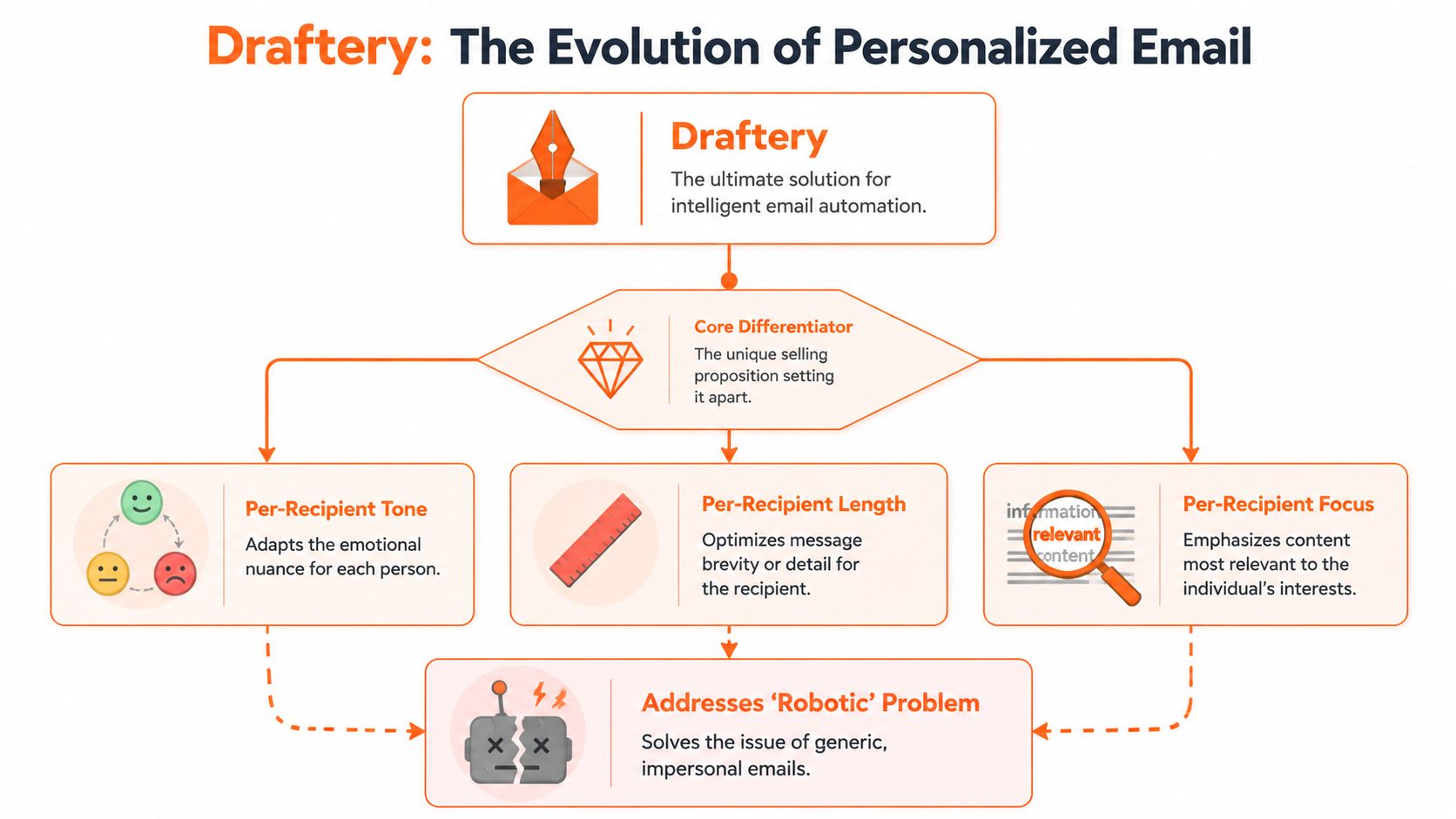
That second model is where personal reply automation gets useful. In this category, one option is Draftery, a Gmail-focused AI email assistant that drafts replies in the user's voice based on past sent emails and places those drafts in Gmail Drafts for review. Its stated differentiator is per-recipient voice matching, which means the draft for one contact can sound different from the draft for another.
Why human approval still matters
Even with a strong drafting system, review is the control point. That's not a flaw. It's the right design choice for relationship-driven communication.
A practical human-in-the-loop flow looks like this:
- Connect your mailbox
- Let the system learn from past sent email
- Receive drafted replies when new messages arrive
- Review, edit if needed, and send
Good automation for high-stakes communication should draft first and send second.
This model keeps the speed benefit while protecting tone, context, and accountability. It also fits how most professionals already work. They don't need an AI to impersonate them unchecked. They need a head start that preserves their voice.
How to Implement Automation The Smart Way
The fastest way to fail with automated email is to automate too much too early. Start with one repeated pain point, not your entire inbox.
For some people that's follow-ups after meetings. For others it's scheduling replies, simple client updates, or first-response drafts for inbound questions. Pick the category that drains the most time while requiring the least emotional nuance.
Start with one narrow use case
A good first use case has three traits:
- It happens often
- It follows a recognizable pattern
- It still benefits from review
Examples include:
- Meeting follow-ups after calls
- Inbound lead acknowledgments
- Status update replies
- FAQ-style client responses
If you start with a sensitive negotiation thread or anything politically delicate, you'll probably blame the tool for a problem caused by bad scope.
Measure the right things
A lot of teams focus on opens and clicks. Those can matter, but they're not enough. Email health starts earlier in the funnel.
According to Twilio SendGrid's guidance on email program analytics, teams should watch deliverability closely, including bounce rates below 2% and spam complaint rates below 0.1%. The same guidance stresses that delivery is not the same as inbox placement. A message can technically arrive and still miss the inbox.
For a practical setup, monitor:
Draft quality
Are you editing lightly or rewriting from scratch?Response speed
Are important emails moving faster?Bounce and complaint health
Are your automated sends hurting sender reputation?Inbox placement
Are messages being seen?
If you're evaluating tools that help draft replies, this guide to the best AI email response generator gives a useful lens for comparing them.
Keep one hand on the wheel
Automation works best when you keep clear approval boundaries.
A simple rule set helps:
- Auto-draft low-risk messages
- Review anything external or sensitive
- Update examples when your tone changes
- Turn off flows that create friction instead of removing it
The goal isn't to build a clever system. The goal is to make email lighter without making your communication worse.
Your Next Step Toward a Quieter Inbox
Automated email used to mean bulk sends, fixed sequences, and rigid rules. That version still matters, but it's no longer the most interesting one for busy professionals.
The more useful shift is from sending automation to thinking support. Instead of asking software to blast messages, you ask it to prepare better replies, faster, with context. That's a much better fit for people whose inbox is tied directly to revenue, delivery, and relationships.
If you remember one thing, make it this: the strongest automated email setup doesn't remove the human. It protects the human from repetitive work so they can spend attention where judgment matters.
If you want to try that model in practice, start a free trial of Draftery and see how AI-drafted replies feel when they're written in your own voice and left for your approval in Gmail. If you'd rather begin with something lighter, try the free Email Tone Analyzer on the site and use it to check whether your drafts sound clear, professional, and like you.