Automatic Email Responder: A Complete 2026 Guide

Your inbox probably looks familiar. A client asks for an update, a lead wants pricing, a teammate needs approval, and three newsletters you forgot to unsubscribe from are sitting on top of everything important. You know some of those messages need a reply now, but writing every response from scratch turns email into a second job.
That's why the idea of an automatic email responder is so appealing. It promises speed, consistency, and less mental overhead. But “automatic email responder” can mean very different things, from a basic out-of-office note to a system that reads the thread, understands the request, and prepares a reply.
The useful way to think about this isn't as one tool category. It's a spectrum. At one end, you have fixed messages that go to everyone. At the other, you have systems that adapt based on context, recipient, and intent. If you run support, sales, consulting, or operations, that difference matters. Even teams trying to automate customer service on Shopify run into the same question: what should be handled automatically, and what still needs a person?
What Is an Automatic Email Responder?
An automatic email responder is any system that sends, drafts, or prepares an email reply without you manually writing it each time.
The simplest version is the one everyone knows. You're on vacation, so Gmail or Outlook sends an out-of-office message that tells people when you'll be back. That's still an automatic responder. It reacts to an incoming email with a preset response.

But most modern inboxes need more than that. A founder might want new leads to get a fast reply. A consultant may want inquiry emails acknowledged immediately. A support team may need common questions sorted before a human even opens them.
The basic idea
Automatic responders exist to reduce repetitive work while keeping communication moving. That can include:
- Immediate acknowledgments that confirm a message was received
- Scheduled follow-ups for sales or onboarding
- Behavior-based emails that trigger after a download, click, pricing-page visit, or abandoned signup, as described in this overview of modern email autoresponder tools
- AI-assisted replies that draft responses based on the message itself
Simple rule: the more important the relationship, the more carefully you should choose how much automation to use.
That's where people get confused. They hear “auto responder” and assume it always means a robotic message sent instantly. It doesn't. Some responders send. Some only draft. Some use rigid templates. Others adapt to the actual email.
So the better question isn't “Should I use an automatic email responder?” It's “What kind of responder fits this kind of email?”
Understanding the Types of Email Responders
There are three main types of email responders, and they differ in triggers, content, and control.
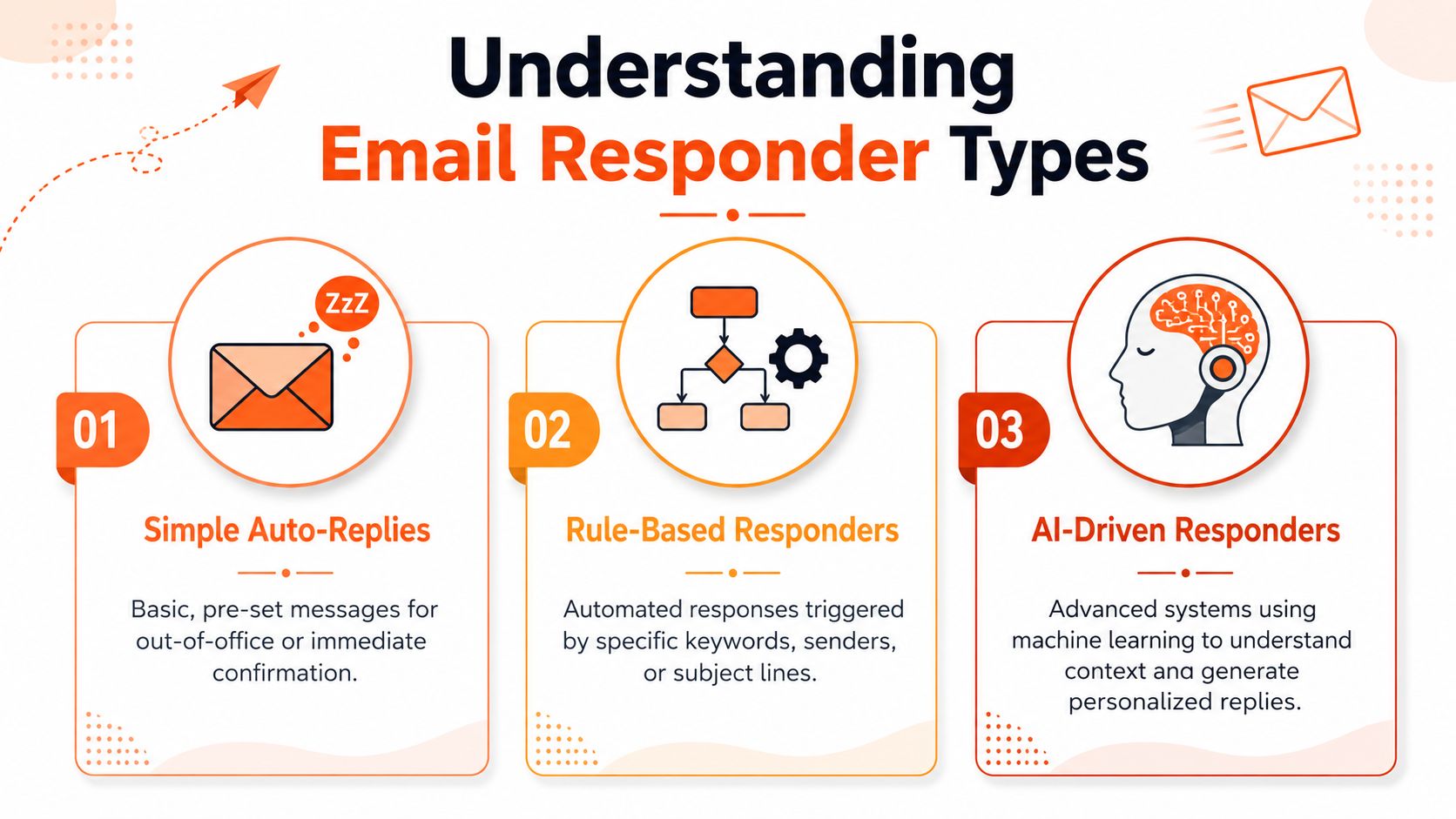
Simple auto-replies
This is the classic out-of-office model. Someone emails you, and they get the same message back.
These responders are static. You write one response in advance, turn it on, and the system uses that exact copy. They're useful when the goal is clarity, not conversation.
Good examples include:
- Vacation messages
- Holiday closures
- Basic “we received your email” confirmations
They don't personalize much. That's fine when the message only needs to set expectations.
Rule-based responders
Rule-based responders are more flexible. They send different emails depending on a condition.
The trigger might be a signup form, a keyword, a list membership, a click, or a page visit. This category became widely used for welcome sequences, lead nurturing, webinar reminders, onboarding, sales follow-ups, and re-engagement flows, with triggers tied to user behavior such as downloads or abandoned signups, as noted in this guide to automated email workflows.
This type works well when your process is predictable. A person downloads a resource, so they get a follow-up. A customer starts onboarding, so they receive a sequence.
AI-driven responders
This is the newest category and the one that changes how people think about inbox work.
A major shift in the market was the move from single-message auto-replies to AI systems that can handle more of the conversation. Current AI responders can draft replies, classify incoming messages, and support objection handling or routing decisions. Some vendors even claim lead response times under 10 minutes in their own materials, while basic tools still need a person to review before sending, according to this overview of AI email responders.
The key difference is personalization. AI-driven systems don't just match a rule. They try to understand context, tone, and the purpose of the message.
Three types of automatic email responders
| Type | Trigger | Content Style | Best For |
|---|---|---|---|
| Simple auto-replies | Any incoming email during a set condition | Fixed, identical message | Out-of-office notices, receipt confirmations |
| Rule-based responders | Predefined rules like signup, click, keyword, or sequence step | Template-based, structured | Marketing flows, onboarding, reminders |
| AI-driven responders | Message content, intent, sender context, or workflow logic | Dynamic, context-aware, more personalized | Support triage, sales replies, inbox assistance |
Generic templates save time. Context-aware drafts save time without sounding generic.
How Modern AI Email Responders Work
AI email tools are often pictured as one black box. Email goes in, reply comes out. In practice, the better systems work more like a skilled assistant who handles the prep work before you respond.
Think of it like an assistant at your desk
A good assistant wouldn't hand you every message in a random pile. They'd first figure out what each email is about, where it belongs, and what matters most. That's also how a technically reliable AI responder is typically designed.
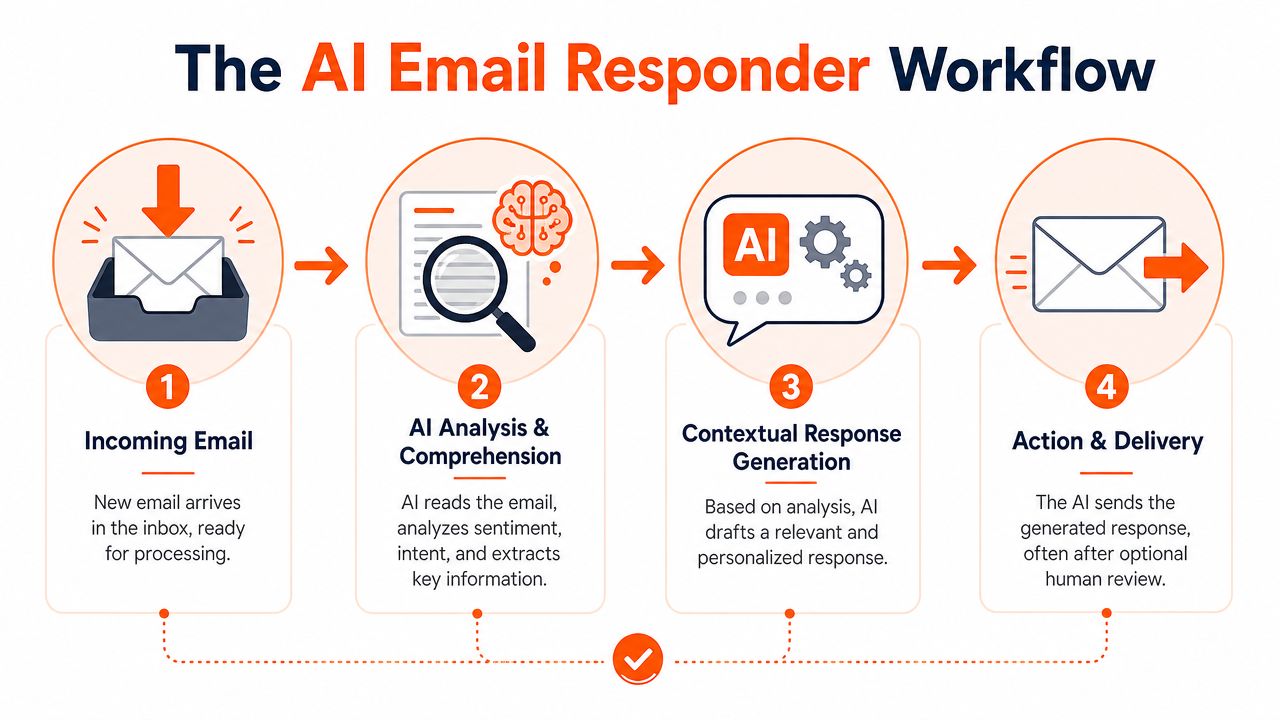
According to Crisp's explanation of AI email response automation, the usual sequence is: classify intent, route the message, summarize the thread, then generate a draft reply. That order matters because it reduces cognitive load early. The biggest operational gain often comes from pre-classification, since it places messages into the right workflow before a human has to untangle them.
The four practical steps
Classification
The system identifies what kind of email it is. Billing issue? Refund request? Bug report? General question?Routing
Once the intent is clear, the message goes to the right queue, person, or workflow.Summarization
Instead of forcing someone to scroll through a long thread, the system pulls out the key points.Draft generation
Only after the system understands the context does it write a suggested reply.
Here's a short visual overview of that process:
Why this feels better than templates
Templates are useful, but they're blunt. They assume the same wording works for many situations. AI systems try to adapt the wording to the actual message.
That's also why writing quality matters. If you're trying to create natural, engaging AI emails, tone adjustment is often the difference between “helpful” and “obviously automated.” Some tools also focus more on drafting than auto-sending, such as an AI email writer for faster replies, which fits teams that want speed without giving up review.
Smart Use Cases for Email Automation
Email automation becomes useful when you connect it to a real workflow, not when you turn it on just because the feature exists.
The most common use cases have been around for a long time. Email autoresponders first became practical in the early commercial email era and are now widely used for welcome sequences, lead nurturing, webinar reminders, onboarding, sales follow-ups, and re-engagement. Modern systems can also trigger messages from behavior like downloads, clicks, pricing-page visits, or abandoned signups, as covered in this article on email autoresponder use cases.
For a founder
A founder gets product inquiries, partnership emails, investor updates, and customer questions in the same inbox. Not all of them deserve the same treatment.
A smart setup might:
- send a quick acknowledgment to new demo requests
- trigger a follow-up after someone visits a pricing page
- prepare support drafts for common questions
- move repetitive customer messages into a support workflow
If that's your world, this guide on how to automate customer service is a useful next step because it ties email automation to actual service operations.
For a consultant
Consultants often lose time on the same administrative replies. A new prospect asks about availability. A current client wants the next steps. Someone requests your rate card.
Automation works well here when it handles the repeatable pieces:
- Inquiry response with a short acknowledgment and timeline
- Onboarding sequence after a signed agreement
- Meeting prep email sent before a kickoff call
The trick is keeping the first response warm enough that it doesn't feel like a form letter.
For sales and account work
Sales teams benefit from speed, but they also need relevance. That's why automation is often strongest at the top and middle of the funnel.
Useful examples include:
- Lead follow-up after a form submission
- Reminder sequences before a webinar or product demo
- Re-engagement emails when a prospect goes quiet
If the email belongs to a repeatable process, automation usually helps. If the email changes the relationship, review it yourself.
Benefits, Risks, and Security of Auto Responders
Automatic responders can save time, but they can also create awkward moments fast. The difference usually comes down to how much judgment the system applies, and how much oversight you keep.

Where they help
The benefits are easy to see in daily work:
- Time savings because people stop rewriting the same answers
- Faster responsiveness since emails get acknowledged or drafted right away
- Consistency because recurring messages follow the same standards
- Coverage outside active work hours for routine interactions
For teams under constant inbox pressure, those gains are meaningful. Even a simple confirmation email can reduce uncertainty for the sender.
Where they go wrong
Problems start when automation responds with confidence in situations that need judgment.
A few common risks:
- Impersonal replies that sound stiff or generic
- Wrong context when the system misunderstands the message
- Tone mistakes in complaints, conflict, or sensitive requests
- Over-automation that makes the inbox feel harder, not easier
This is why many professionals dislike “AI email” in practice. They don't hate speed. They hate sounding like a bot.
Security questions worth asking
Inbox access is a real trust issue. Before you use any automatic email responder, ask practical questions.
What data does it read
Does the tool access only what it needs, or the entire mailbox?What actions can it take
Can it send messages automatically, or only draft and suggest?How is data handled
Is the provider clear about storage, deletion, and model training?
If you're evaluating vendors, it helps to review how they explain user data protection in plain terms. The specifics vary, but the principle is simple: email tools should make their boundaries obvious.
A responder that saves time but creates privacy anxiety isn't a productivity tool. It's another thing to manage.
The Big Problem with Full Automation (and a Smarter Fix)
The biggest weakness in the automatic email responder category isn't technical. It's judgment.
A fully automated system can answer quickly, but speed isn't the same as professionalism. Some messages are routine. Others are delicate. If a customer sends an angry complaint, an employee raises an HR issue, or a prospect asks a pricing question with legal sensitivity, the wrong tone can do real damage.
That's why one of the most important questions is also the least discussed: when should the system not answer automatically? A strong critique of the category points out that most AI responder coverage focuses on productivity wins while skipping the higher-risk cases that need human judgment. The same analysis argues these tools work best when they handle low-risk emails and leave the small share of nuanced messages for people, supporting a human-in-control model of “pre-write everything, escalate edge cases,” as discussed in this review of AI responder limits.
Full auto-send sounds better than it feels
On paper, full automation looks like the end goal. The machine reads. The machine writes. The machine sends. Inbox solved.
In real work, that model breaks down for three reasons:
Not every email should be answered immediately
Some messages need a pause, a manager review, or a policy check.Not every sender should get the same tone
The way you write to a client, teammate, recruiter, or executive isn't interchangeable.Not every correct answer is a good answer
An email can be factually fine and still feel cold, defensive, or careless.
The smarter model is draft-first
A better approach is simple: let the system do the heavy lifting, but keep the final send with the human.
In a draft-first model, the responder reads the incoming email, prepares a reply, and places that reply where you already work. You review it, adjust if needed, and send it. That gives you most of the speed benefit without handing over the risky part.
This model is especially useful for busy professionals who care about quality. Founders, consultants, executives, and freelancers don't just need faster replies. They need replies that still sound like them.
What to look for instead
If you want an automatic email responder that works in real life, prioritize these qualities:
Drafts instead of blind sending
Safer for nuanced communication.Per-recipient adaptation
Your tone should shift depending on who's writing to you.Thread awareness
The system should use the actual conversation, not just a generic template.Escalation paths
Sensitive messages should be easy to hold back for manual review.
The best automation doesn't remove you from communication. It removes the repetitive part and leaves the judgment with you.
That's the mental shift. The goal isn't maximum automation. It's maximum advantage with retained control.
Quick Setup Guide and Best Practices
If you're starting simple, Gmail and Outlook already give you a basic entry point. In Gmail, use the vacation responder for out-of-office replies and filters for simple routing. In Outlook, automatic replies handle away messages, while rules can sort, forward, or trigger template-based actions depending on your setup.
For anything beyond that, keep these practices in mind:
Start with low-risk emails
Use automation first for confirmations, scheduling, onboarding, and common requests.Review the wording
A fast reply only helps if it sounds appropriate.Be clear about expectations
If your message is an acknowledgment, say when a human will follow up.Test edge cases
Look at complaints, ambiguous requests, and unusual senders before trusting any workflow.Keep a human in the loop
For important relationships, draft-first is usually safer than auto-send.
The best automatic email responder isn't the one that does everything by itself. It's the one that removes busywork while protecting your judgment, tone, and relationships.
If you want that draft-first approach in practice, Draftery is built for it. It connects to Gmail, learns how you write, and prepares ready-to-review drafts that sound like you, including different tones for different recipients. You stay in control, nothing sends automatically, and you can start with a free trial.