AI Email Responder: Automate Replies in Your Voice

You open Gmail to clear a few messages before your next meeting. Instead, you find client questions, internal updates, a sales follow-up you meant to send yesterday, and one message that needs a careful reply because the relationship matters. None of them are hard on their own. Together, they eat your morning.
That's where users often start looking for an email responder. They want help, but not the kind that fires off robotic replies and makes them sound like a help desk from 2012. They want something that takes work off their plate without flattening their voice.
The big shift isn't from manual email to automation. It's from static automation to intelligent drafting. That difference matters more than most guides admit.
Your Inbox Is Overwhelming Your Responder Is Outdated
A founder wakes up, grabs coffee, and checks email before anything else. There's a note from a customer asking for clarification, a warm intro from an investor, two partnership pitches, and a message from a contractor waiting on a decision. Every reply needs a different tone. One should be warm. One should be crisp. One should buy time without sounding evasive.
That's the problem with email overload. It isn't only volume. It's context switching.
Modern email pressure is also faster than commonly understood. The average email response time is 12 hours, yet 89% of customers expect businesses to respond within 1 hour, according to email response time research summarized by Superhuman. Email used to feel like delayed correspondence. For many teams, it now behaves more like chat with higher stakes.
Why speed alone doesn't solve it
You can answer fast and still answer badly. Busy professionals know this feeling. You send a quick reply, then reread it later and realize it sounds too blunt for a client, too formal for a teammate, or too vague for someone waiting on a decision.
An old-school email responder promised relief years ago. In practice, it usually meant one of two things:
- A canned auto-reply that went out to everyone
- A rule-based sequence that sent the same follow-up to every contact in a bucket
Those tools helped with coverage, not judgment.
Practical rule: If a reply could go to anyone, it probably sounds like it was written for no one.
That's why so many professionals still feel stuck, even after “automating” email. The messages still need editing. The tool still needs babysitting. And the hardest part of email, deciding what to say to this person in this thread right now, still lands on you.
If that sounds familiar, it helps to look at your workflow through the same lens as broader email overload management habits. The bottleneck usually isn't only the inbox. It's the amount of thinking each message requires before you can press send.
What an email responder should actually do
A useful email responder should reduce three kinds of work:
- Reading work so you don't have to reconstruct the thread every time
- Writing work so you're not drafting from a blank screen
- Tone work so your reply fits the relationship
Basic responders handled none of those well. They sent something. They didn't understand anything.
That's why the category has changed. The interesting question isn't whether you can automate replies. It's whether your responder can help you reply like yourself, with the right level of context, and still keep you in control.
Understanding the Classic Email Autoresponder
A classic autoresponder works like a vending machine. Someone triggers it, and it delivers the preselected item. No interpretation. No adaptation. Just a rule and an output.
If an email arrives, send message A. If someone fills out a form, send message B. If it's after hours, send the out-of-office note.
That's the core logic behind the traditional email responder.
How the old model works
Most classic autoresponders rely on simple if-then rules:
- Inbound trigger: When a message arrives, the system sends a preset reply
- Time trigger: After a delay, it sends a scheduled follow-up
- List trigger: If a contact belongs to a segment, they get a specific sequence
That model is still useful for narrow cases. Vacation replies, receipt confirmations, and basic acknowledgments are all fine candidates.
For a deeper look at those simpler workflows, this guide to an auto responder for email is a good reference point.
Where it breaks down
The trouble starts when the message needs judgment.
A client writes, “Checking in on the proposal. We also need to discuss timeline changes.” A traditional autoresponder can't tell whether this is a gentle nudge, a sign of concern, or the start of a more sensitive conversation. It can only fire the message it was told to fire.
That creates three common problems:
- It sounds generic. The same reply goes to everyone, even when the relationship is different.
- It ignores thread history. It doesn't remember what was promised, asked, or implied.
- It mishandles nuance. It can't tell the difference between a routine request and a risky one.
A canned response is fine for confirming receipt. It's weak at carrying a relationship.
There's also a technical issue many people never see until it causes trouble. Per RFC 3834 on automatic email responses, systems need loop detection to prevent “sorcerer's apprentice mode,” where two autoresponders keep replying to each other. That sounds niche until you picture inbox clutter, duplicate notifications, and systems talking to systems with no human involved.
The right way to think about classic autoresponders
Traditional autoresponders are not bad. They're just narrow tools.
They're best when the job is to acknowledge, confirm, or route. They struggle when the job is to respond intelligently. That's why people often confuse “automation” with “assistance.” The first removes clicks. The second removes thinking.
If your inbox mostly contains repetitive messages with obvious answers, a classic autoresponder may be enough. If your inbox contains clients, prospects, partners, and teammates who all expect a human voice, the old model runs out of road quickly.
AI Email Responders vs Traditional Autoresponders
The easiest way to understand the shift is this. A traditional autoresponder follows a script. An AI email responder acts more like a good assistant who reads the room before speaking.
It doesn't just send a prewritten line. It drafts a reply based on the thread, the sender, and the tone the situation calls for.

The old way and the new way
A traditional responder optimizes for consistency. An AI email responder optimizes for relevance.
That matters because relevance changes outcomes. According to Mailmeteor's cold email statistics roundup, advanced personalization can raise reply rates to 17% versus 7% without it. The lesson isn't that every inbox should become a sales machine. It's that people answer messages that feel specific to them.
Here's the difference in plain terms.
| Feature | Traditional Autoresponder | AI Email Responder |
|---|---|---|
| How it works | Sends a preset message after a trigger | Drafts a new reply from context |
| Personalization | Limited, often name-only | Adapts tone, phrasing, and content |
| Context handling | Minimal | Reads the thread and uses surrounding details |
| Learning | Doesn't improve unless rules are changed | Can refine drafting from usage and feedback |
| Best for | Out-of-office notes, confirmations, simple sequences | Client replies, sales follow-ups, internal coordination, nuanced responses |
Why the distinction matters in daily work
A consultant gets an email from a client that says, “Can you send a revised scope? Budget is tighter than we expected.” A traditional responder can confirm receipt. An AI responder can draft something like: acknowledge the budget shift, suggest a smaller phase-one scope, and keep the tone calm rather than defensive.
A founder gets two inbound messages within minutes. One is from a close collaborator. The other is from someone they've never met asking for a partnership. Those replies shouldn't sound the same. The value of AI isn't only that it writes faster. It can start from a different stance for each relationship.
If you work in B2B outreach or lifecycle messaging, there's also a useful adjacent view in this piece on the Breaker platform for B2B growth, which highlights how AI-driven email workflows become more useful when they respond to context instead of relying on rigid templates.
Key takeaway: Templates save typing. Context-aware drafting saves judgment.
What AI still shouldn't do
An AI email responder is not a license to stop thinking. It should help with the first draft, not take over sensitive communication. That distinction keeps the tool useful.
The strongest setups treat AI as a drafting layer. It reads, proposes, and formats. You review, tweak if needed, and decide whether it gets sent. That's a different category from automation that just pulls the trigger.
Once you see that difference, the category gets much clearer. A traditional autoresponder is a rule engine. An AI email responder is a writing assistant connected to your real communication habits.
How AI Learns to Write Emails In Your Voice
The phrase “writes in your voice” often leads to assumptions of magic or marketing fluff. In practice, it's closer to training a new assistant. The assistant studies how you usually write, notices how your tone changes by recipient, and prepares a draft before you sit down to answer.
That's the useful version of an AI email responder.
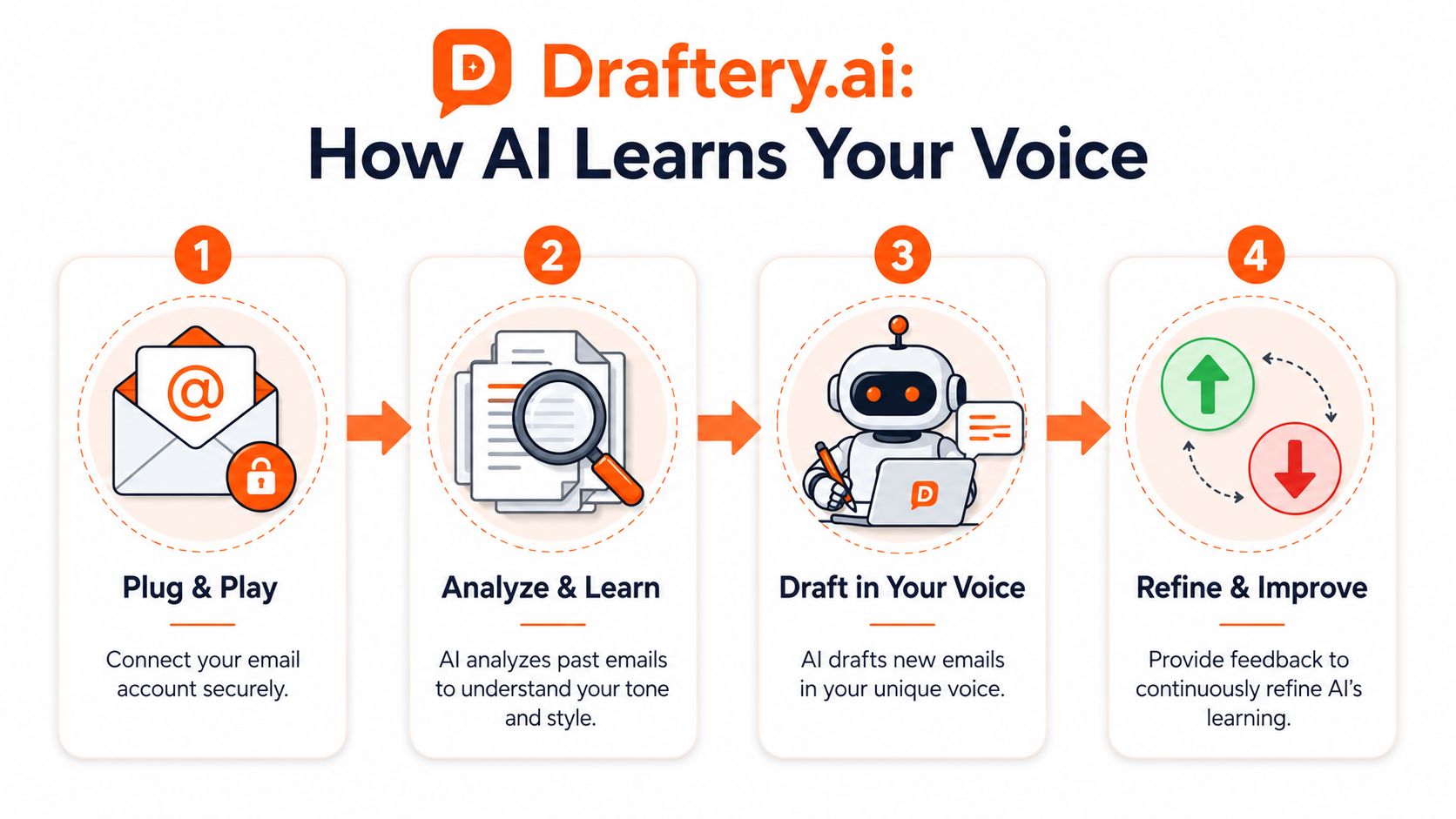
To make the process concrete, it helps to look at a Gmail-focused tool like Draftery, which drafts replies in the user's writing style and places them in Gmail Drafts for review.
Step one is studying what you've already written
The system starts by connecting to your email account with read-only access. It looks at your sent messages to learn patterns such as:
- how formal you are
- whether you write short or long replies
- how you greet people
- how direct you sound
- whether you use humor, warmth, or emoji
- how your style changes with specific contacts
That last point matters more than is generally assumed. You don't write to your CEO the same way you write to a colleague you message daily. A useful email responder shouldn't flatten those differences. It should preserve them.
For a broader look at tools in this category, this overview of an AI email helper explains how drafting assistants fit into day-to-day workflows.
Step two is reading the current thread, not just the latest line
A weak AI system only reacts to the newest message. A better one reads the thread and notices what has already been said.
That includes things like:
- Unfinished commitments: You said you'd send a document last week
- Relationship cues: The sender is a recurring client, not a cold contact
- Conversation mood: The exchange is relaxed, urgent, or sensitive
Without that grounding, even polished writing can miss the point.
Microsoft's reference architecture for an AI email responder reflects a common best practice here: AI generates the draft, and a human reviews it before sending. That design matters because business email often carries commitments, approvals, and relationship signals that need final human judgment.
Here's a walkthrough that helps make the drafting flow easier to picture:
Step three is generating a draft that sounds like you
A generic paragraph is typically what people expect. The better systems don't stop at “professional tone.” They try to mirror your typical style for that specific recipient.
A reply to a teammate might be short and casual:
Yep, saw this. I'll send a cleaned-up version this afternoon.
A reply to a client might be more structured:
Thanks for the note. I've reviewed the request and can send an updated version this afternoon with the revised scope and timeline.
Same intent. Different voice.
Step four is letting your behavior sharpen the drafts
The feedback loop matters. If you send a draft unchanged, that tells the system it was close. If you edit the greeting every time, it learns something else. If you delete a category of drafts, that's also a signal.
This is why the best AI email responder feels less like autocomplete and more like a junior staff member who gets better as they work with you.
The privacy question people ask right away
They should ask it.
Email contains client details, personal context, and business decisions. Any serious tool in this category needs clear controls. With Draftery's published product details, the model is read-only on the inbox side, drafts are suggestions rather than sent messages, user data is encrypted, and the company states that it does not train AI models on user content.
That combination matters. Trust in an email responder doesn't come from clever copy. It comes from limits.
Putting Your AI Email Responder to Work
An AI email responder becomes useful when it fits the messy reality of a workday. Not as a demo. As a working habit.
The biggest win is usually not “writing faster” in the abstract. It's removing the blank page from the emails you keep postponing.
A founder handling inbound conversations
Before using AI assistance, a founder often opens an email, scans the thread, thinks through the politics of the reply, gets interrupted, and comes back later. The draft may sit half-finished because the message needs the right balance of speed and care.
With an AI responder, the founder opens the thread and sees a draft already waiting. It doesn't end the decision-making. It shortens the path to it.
A few common founder use cases:
- Investor updates: A draft can summarize traction, answer a question directly, and keep the tone confident without sounding inflated.
- Partnership requests: The draft can be polite but selective, which is useful when “not now” still needs to preserve the relationship.
- Customer issues: The message can acknowledge the problem first instead of jumping straight to explanation.
A consultant protecting client tone
Consultants often have a different problem. They can write strong emails, but every client expects a slightly different style. One likes brevity. Another wants warmth. A third reads any short reply as dismissive.
That's where message framing matters, not just wording.
As Ian Brodie's piece on choosing the right email angle points out, effective emails match their angle to the recipient's awareness. If the recipient doesn't yet see the problem, the email should lead with the problem. If they already understand it, the draft can move to objections, story, or a sharper framing.
Ask your AI responder for more than “a reply.” Ask for “a reply for someone who doesn't yet see why this matters.”
That turns the tool from a writing shortcut into a strategy aid.
A simple before and after
Consider an inbound client note: “We're not sure the current approach is working. Can you suggest another direction?”
Before AI assistance:
You reread the thread, search for old notes, try to remember what they objected to last time, then draft from scratch.
After AI assistance:
You open the message and see a draft that already acknowledges the concern, references the current approach, and proposes a new direction in your usual style. You edit a sentence or two and send.
Prompts that make the drafts better
You don't need complex prompting. You need clear intent. Good requests sound like this:
- For a skeptical prospect: Draft a calm reply that addresses hesitation without sounding pushy.
- For a client who's unaware of the root issue: Make this problem-focused rather than feature-focused.
- For an internal thread: Keep it short, direct, and friendly.
That's the jump from old automation to intelligent help. The tool isn't just filling space. It's helping you choose the right stance for the person on the other end.
Best Practices for Using an AI Email Responder
The first month with an AI email responder goes better when you treat it like onboarding a new assistant. You don't expect perfection on day one. You look for good judgment, fast correction, and steady improvement.
What to do in your first weeks
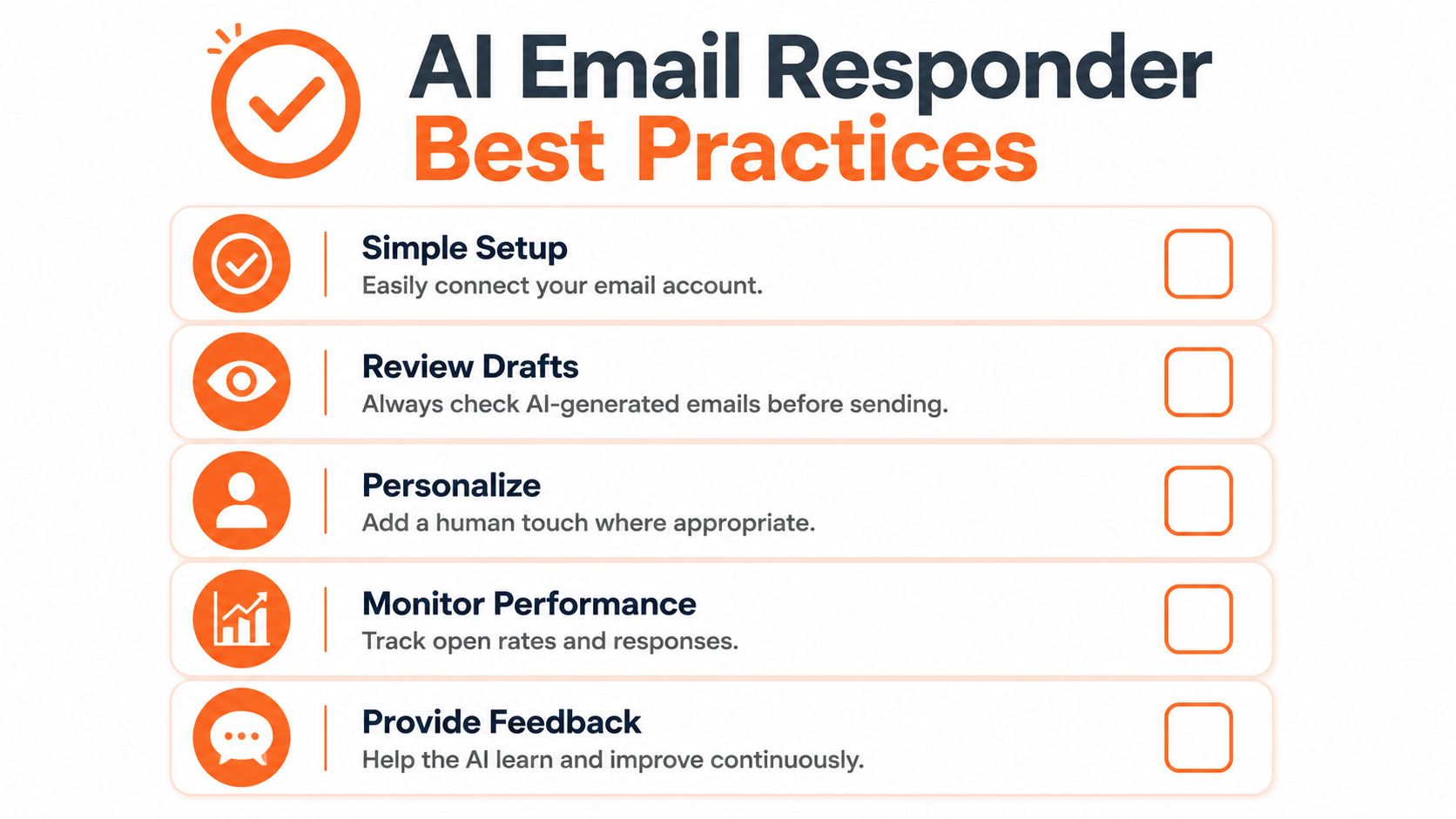
- Review every draft carefully: Early review teaches you where the tool is strong and where it needs steering.
- Edit naturally, not performatively: Don't rewrite just to “make it yours.” Change only what you'd truly change.
- Notice repeat corrections: If you keep adjusting closings, greetings, or level of detail, that pattern is useful feedback.
- Reserve sensitive messages for closer review: High-stakes conversations still deserve a slower read.
- Use it for the boring middle first: Follow-ups, scheduling, clarifications, and routine check-ins are ideal training ground.
Don't judge it only on first replies
A strong email workflow also includes the messages that didn't get answered.
For silent contacts, Listrak's guidance on re-engaging chronic non-openers recommends a multi-pass re-engagement sequence over about 30 days, with varied subject lines and timing rather than a single resend. That's a useful reminder for any email responder setup. Good assistance isn't only about the first draft. It also helps you avoid repetitive follow-ups that sound copied and tired.
If you run webinars, launches, or nurture flows, a practical companion resource is this guide to webinar follow-up drip campaign strategy, especially for thinking about how one message leads into the next without repeating itself.
The goal isn't to automate your personality. It's to remove low-value drafting work so you can spend attention where judgment matters.
A short operating checklist
Keep this simple:
- Start with routine threads
- Review before sending
- Let repeated edits teach the system
- Use different framing for different audiences
- Build follow-up sequences that vary in tone and angle
That's the pattern that tends to work. Not blind trust. Not total skepticism. Just steady use with clear human control.
If you want to try this style of workflow in Gmail, Draftery drafts replies in your own voice, places them in your Drafts folder for review, and keeps the final send decision with you. Start my free trial.